

Welcome to today’s post.
In today’s post I will be explaining how custom entity pattern matching is used when determining speech recognition intent from audio inputs.
In the previous post I showed how to use basic pattern matching when determining speech recognition intent from audio inputs.
Both types of speech intent processing are offline based, which means that we use fixed phrase patterns within an intent model, however with pattern matched intent, we use a custom pattern matching model for each speech model. Within each pattern matching model, we add our speech phrase patterns, custom intent entities.
We than apply the collection of pattern-matching language models to our intent recognizer. In terms of the Speech SDK, I will go through the structures and SDK methods we need to use to achieve the population of the language models before requesting audio input.
In the first section, I will explain what and how custom pattern matching with entities is used within intent models and some of the useful pattern matching features that are available.
Using Custom Entities with Pattern Matched Intent
With phrases that are used for pattern matching of intents, when we use non-entity-based pattern matching, we added phrases to the IntentRecognizer class using the AddIntent() method. An example is shown below:
intentRecognizer.AddIntent("Switch {action} {roomName} lights.", "OnOffLights");
The phrase used in the above intent used literal pattern matching of any recognized word that matched the position in the phrase pattern.
In the example above, with the phrase pattern:
Switch {action} {roomName} lights.
we would have to match exactly four words. In addition, we would have to match a text word to each of the parameters {action} and {roomName}. In addition, we would have to match exactly one word for each parameter. For instance, we can match the word living to {roomName} parameter, but not the words living room. In addition, we would not be able to match word parameters that were of non-string types, such as numbers. We would also not be able to match and restrict matches to a fixed list of values.
The above-mentioned restrictions in the simplified pattern used for basic intent pattern matching are resolved by using custom-entity pattern matched speech intent models.
To be able to setup custom-entity pattern matched speech intent models we need to configure two structures for each intent model:
- Pattern matching intents.
- Custom pattern matching entities.
In the next section, I will show how to use the Speech SDK to build custom entity pattern matched intents and use them for speech recognition.
An example of a pattern-matched intent phrase includes both syntactic rules and entity placeholders. With the following example phrase:
“(Turn | Switch) (on | off) [any of] [the] {roomName} lights.”
I will explain some of the syntactic rules:
The required rule with the opening and closing rounded brackets ( … )
This allows us to specify a word or words within the brackets that must be included in the speech recognition processing output if they are detected in the speech input, and invalid if not uttered. In the required words below:
(Turn | Switch)
(on | off)
We can choose any combination of the following:
Turn on
Turn off
Switch on
Switch off
For example:
Turn off …
Switch on …
The optional rule with the opening and closing brackets [ … ]
This allows us to specify a word, words or none within the brackets that are included in the speech recognition processing output if they are detected in the speech input, and do not need to be included if they are not uttered. In the optional words below:
[any of]
[the]
We can choose any combination of the following:
any of the
any of
the
“” (none selected)
For example:
any of the …
the …
The choice operator with the vertical pipe | operator.
This allows us to select from of a choice of words within an optional or required bracket operator:
(Turn | Switch)
We choose either:
Turn
or
Switch
The entity parameter match with the braces operators { … }
This allows us to match an entity within the recognized phrase. Entities that are matched with the parameter are added to the Entities key-value pair property of the intent recognition result.In the phrase pattern:
“(Turn | Switch) (on | off) [any of] [the] {roomName} lights.”
When we process the spoken sentence:
Turn off the living room lights.
the matched entity will be roomName and value will be “living room”. The diagram below shows how we build a language model the includes custom entities and intent phrase patterns that we use for speech intent recognition:
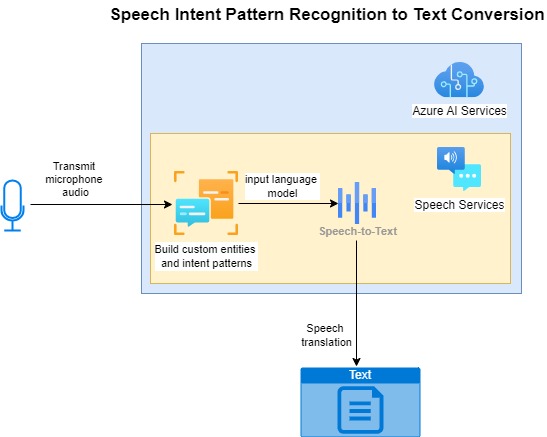
In the next section I will show how to use the Speech SDK to construct the custom entity pattern matching intents, define the custom entities, and include the pattern-matched intents into the language model.
Using the Speech SDK to Build Custom Entity Pattern Matched Intent Models
To build custom entity pattern matched intent models we start off by creating a named instance of the Speech SDK class, PatternMatchingModel. The constructor takes an argument which is the name of the language model. An example of how this is done is shown below:
var model = new PatternMatchingModel("HomeAutomationPatternMatchingModelId");
As I mentioned in the previous section, we will need to configure two structures within the Intents property collection of the above model instance. We use the Add() method of the Intents collection to add instances of classes PatternMatchingIntent and PatternMatchingEntity.
We add instances of the PatternMatchingIntent class that include the definition of the intent. The constructor includes the following parameters:
Intent Identifier
Intent Pattern Matched Phrase(s)
Below is an example where we add a pattern-matched intent instance into the Intents collection:
model.Intents.Add(
    new PatternMatchingIntent(
        "OnOffLights",
        "(Turn | Switch) (on | off) [the] ({roomName}) lights."
    )
);
As I mentioned earlier, the custom entity can also be defined for the roomName parameter.
To add a custom pattern matched entity, we use the static constructor method CreateListEntity() of the SDK class PatternMatchingEntity. The parameters for the CreateListEntity() constructor are:
Entity name.
EntityMatchMode.
Entity phrase string values.
Possible values for the EntityMatchMode parameter are:
Strict. Only exact text matches within the entity phrases.
Basic. Default matching based on the entity type.
Fuzzy. Matches text within the slot the entity is within without processing the text.
Below is an example where we add a custom intent entity instance with a list of entity values into the Intents collection:
model.Entities.Add(
    PatternMatchingEntity.CreateListEntity(
        "roomName",
        EntityMatchMode.Strict,
        "living room",
        "dining room",
        "bed room",
        "study room",
        "kitchen",
        "1st bed room",
        "2nd bed room"
    )
);
Once we have populated the model, model for the custom entity intent patterns, we can pass it to an instance of the LanguageUnderstandingModelCollection Speech SDK class as a collection:
var modelCollection = new LanguageUnderstandingModelCollection();
modelCollection.Add(model);
The next step is to apply the above Language understanding model to an instance a configured IntentRecognizer class. This is done by passing the model collection instance into the ApplyLanguageModels() method of the IntentRecognizer class as shown:
recognizer.ApplyLanguageModels(modelCollection);
We then run the speech recognition using the familiar RecognizeOnceAsync() method of the IntentRecognizer class as shown:
var result = await recognizer.RecognizeOnceAsync();
In the next section, I will explain how the entities and values are read in from the intent recognition results.
Processing Results from Custom Entity Pattern Matched Speech Intent Models
When an intent speech is recognized after reading in the input source, the following result enumeration, ResultReason.RecognizedIntent is returned from the Reason property of the result.
The return result includes the following properties:
Text
IntentId
Entities
Where:
Text is the recognized speech text that has been matched from the recognition intent pattern phrase and custom entities defined within the language model.
IntentId is the intent identifier of the intent of the matching phrase pattern.
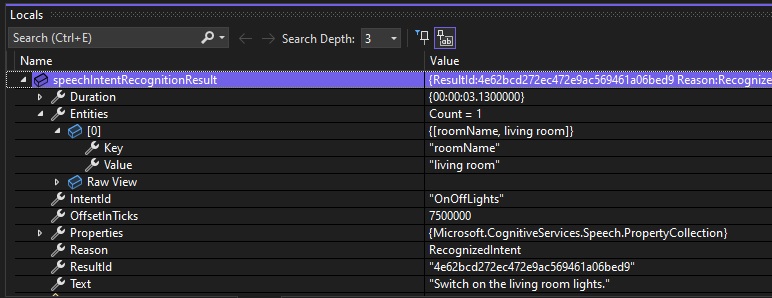
Entities is a list of key-value pairs that contain the parsed entities and their respective values from the matched speech pattern.
In the next section, I will put together the sample code for speech intent recognition with custom entity pattern matching for a small home automation language model.
Sample Custom Entity Pattern Matching Speech Intent Application
Below is the main code block that sets up configuration to the Azure AI Services Speech SDK and calls the RunCustomEntityIntentPatternMatchingSingleCommand() method to request speech inputs for speech intent recognition processing:
async static Task Main(string[] args)
{
    HostApplicationBuilder builder = Host.CreateApplicationBuilder(args);

    string speechKey = Environment.GetEnvironmentVariable("SPEECH_KEY");
    string speechRegion = Environment.GetEnvironmentVariable("SPEECH_REGION");

    builder.Services.AddLogging(
        l => l.AddConsole().SetMinimumLevel(LogLevel.None));

    using IHost host = builder.Build();

    var speechConfig = SpeechConfig.FromSubscription(speechKey, speechRegion);
    speechConfig.SpeechRecognitionLanguage = "en-US";

    var sourceLanguage = "en-US";
    var destinationLanguages = new List<string> { "it", "fr", "es", "tr" };

    var speechTranslationConfig = SpeechTranslationConfig.FromSubscription(speechKey, speechRegion);
    speechTranslationConfig.SpeechRecognitionLanguage = sourceLanguage;

    Console.WriteLine("For Speech Intent Pattern Recognition Press P.");
    Console.WriteLine("Press Escape to finish.");
    ConsoleKeyInfo consoleKeyInfo = Console.ReadKey(true);
    if (consoleKeyInfo.Key == ConsoleKey.P)
        RunCustomEntityIntentPatternMatchingSingleCommand(speechConfig);
    await host.RunAsync();

    Console.WriteLine("Application terminated.");
}
Below is the implementation of the method RunCustomEntityIntentPatternMatchingSingleCommand(), which uses the speech service configuration parameter:
static async void RunCustomEntityIntentPatternMatchingSingleCommand(
SpeechConfig speechConfig)
{
    ConsoleKeyInfo consoleKeyInfo;
    bool isFinished = false;

    using (var recognizer = new IntentRecognizer(speechConfig))
    {
        LanguageUnderstandingModelCollection modelCollection = buildCustomEntityIntentPattern();

        recognizer.ApplyLanguageModels(modelCollection);

        while (!isFinished)
        {
            Console.WriteLine("Give an instruction in the microphone...");

            var result = await recognizer.RecognizeOnceAsync();

            OutputPatternMatchedSpeechIntentRecognitionResult(result);

            Console.WriteLine("Press Y to give another sample. Escape to finish.");
            consoleKeyInfo = Console.ReadKey(true);
            if (consoleKeyInfo.Key == ConsoleKey.Escape)
            {
                Console.WriteLine("Escape Key Pressed.");
                isFinished = true;
            }
        }
    }
}
What the above method does is to use the method buildCustomEntityIntentPattern() to build the language model for the custom entity pattern matching speech intent recognition. Then is applies the language model to the intent recognizer.
It then requests microphone input from the user and sends the results to the method OutputPatternMatchedSpeechIntentRecognitionResult() for parsing and output.
Below is the method buildCustomEntityIntentPattern() to build the language model:
/// <summary>
/// Build a language understanding model collection
/// </summary>
/// <returns></returns>
private static LanguageUnderstandingModelCollection buildCustomEntityIntentPattern()
{
    var model = new PatternMatchingModel("HomeAutomationPatternMatchingModelId");

    //Add Intents with Patterns to Model
    model.Intents.Add(
        new PatternMatchingIntent(
            "OnOffLights",
            "(Turn | Switch) (on | off) [the] ({roomName}) lights."
        )
    );

    model.Intents.Add(
        new PatternMatchingIntent(
            "OnOffAppliance",
            "(Turn | Switch) (on | off) [the] ({applianceName}) power."
        )
    );

    model.Intents.Add(
        new PatternMatchingIntent(
            "AdjustVolumeLevel", "(Set | Adjust) [the] ({applianceName}) volume level [to be] ({volumeLevel})
        )
    );

    model.Intents.Add(
        new PatternMatchingIntent(
            "AdjustTemperatureLevel",
            "Adjust [the] ({applianceName}) temperature [to be] ({temperatureLevel})."
        )
    );

    model.Intents.Add(
        new PatternMatchingIntent(
            "OpenCloseBlinds",
            "({action}) ({roomName}) blinds."
        )
    );

    // Define the Custom Intent Entities
    model.Entities.Add(
        PatternMatchingEntity.CreateListEntity(
            "roomName",
            EntityMatchMode.Strict,
            "living room",
            "dining room",
            "bed room",
            "study room",
            "kitchen",
            "1st bed room",
            "2nd bed room"
        )
    );

    model.Entities.Add(
        PatternMatchingEntity.CreateListEntity(
            "applianceName",
            EntityMatchMode.Strict,
            "television",
            "radio",
            "air conditioner",
            "fan"
        )
    );

    model.Entities.Add(
        PatternMatchingEntity.CreateIntegerEntity("volumeLevel")
    );

    model.Entities.Add(
        PatternMatchingEntity.CreateIntegerEntity("temperatureLevel")
    );

    // Add model to model collection..
    var modelCollection = new LanguageUnderstandingModelCollection();
    modelCollection.Add(model);

    return modelCollection;
}
The above code is explanatory from the previous section, when I discussed the useful speech SDK methods used to build the PatternMatchingIntent and PatternMatchingEntity classes.
The output of speech recognition results from the custom entity speech intent pattern matching is implemented within the OutputPatternMatchedSpeechIntentRecognitionResult() method:
static void OutputPatternMatchedSpeechIntentRecognitionResult(IntentRecognitionResult speechIntentRecognitionResult)
{
        string roomName = String.Empty;
        string applianceName = String.Empty;
        string temperatureLevel = String.Empty;
        string volumeLevel = String.Empty;
        string action = String.Empty;

        if (speechIntentRecognitionResult.Reason == ResultReason.RecognizedIntent)
        {
            Console.WriteLine($"RECOGNIZED: Text={speechIntentRecognitionResult.Text}");
            Console.WriteLine($"       Intent Id={speechIntentRecognitionResult.IntentId}.");

            var entities = speechIntentRecognitionResult.Entities;
            switch (speechIntentRecognitionResult.IntentId)
            {
                case "OnOffLights":
                    if (entities.TryGetValue("roomName", out roomName))
                    {
                        Console.WriteLine($"       RoomName={roomName}");
                    }
                    break;

                case "OnOffAppliance":
                    if (entities.TryGetValue("applianceName", out applianceName))
                    {
                        Console.WriteLine($"       ApplianceName={applianceName}");
                    }
                    break;

                case "AdjustVolumeLevel":
                    if (entities.TryGetValue("applianceName", out applianceName))
                    {
                        Console.WriteLine($"       ApplianceName={applianceName}");
                    }
                    if (entities.TryGetValue("volumeLevel", out volumeLevel))
                    {
                        Console.WriteLine($"       VolumeLevel={volumeLevel}");
                    }
                    break;

                case "AdjustTemperatureLevel":
                    if (entities.TryGetValue("applianceName", out applianceName))
                    {
                        Console.WriteLine($"       ApplianceName={applianceName}");
                    }
                    if (entities.TryGetValue("temperatureLevel", out temperatureLevel))
                    {
                        Console.WriteLine($"       VolumeLevel={temperatureLevel}");
                    }
                    break;

                case "OpenCloseBlinds":
                    if (entities.TryGetValue("action", out action))
                    {
                        Console.WriteLine($"       Action={action}");
                    }
                    if (entities.TryGetValue("roomName", out roomName))
                    {
                        Console.WriteLine($"       RoomName={roomName}");
                    }
                    break;
            }
        }
        else if (speechIntentRecognitionResult.Reason == ResultReason.RecognizedSpeech)
        {
            Console.WriteLine($"RECOGNIZED: Text={speechIntentRecognitionResult.Text}");
            Console.WriteLine($"    Intent not recognized.");
        }
        else if (speechIntentRecognitionResult.Reason == ResultReason.NoMatch)
        {
            Console.WriteLine($"NOMATCH: Speech could not be recognized.");
        }
        else if (speechIntentRecognitionResult.Reason == ResultReason.Canceled)
        {
            var cancellation = CancellationDetails.FromResult(speechIntentRecognitionResult);
            Console.WriteLine($"CANCELED: Reason={cancellation.Reason}");

            if (cancellation.Reason == CancellationReason.Error)
            {
                Console.WriteLine($"CANCELED: ErrorCode={cancellation.ErrorCode}");
                Console.WriteLine($"CANCELED: ErrorDetails={cancellation.ErrorDetails}");
                Console.WriteLine($"CANCELED: Did you set the speech resource key and region values?");
            }
        }
}
In the final section I will go over some sample inputs and results and analyse them in detail.
Sample Runs with Phrases to Test Speech Intent Entity Pattern Matching
Test 1. Phrase: “Switch on the living room lights”
Intent: “OnOffLights”
Phrase Pattern: “(Turn | Switch) (on | off) [the] ({roomName}) lights.”
In the first spoken phrase, the session output for the above spoken phrase is shown below:
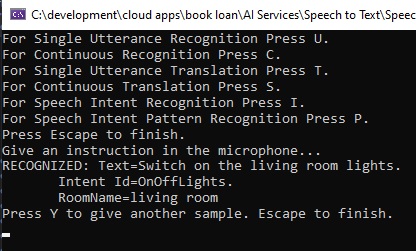
The first attempt has been successfully recognised with the intent captured correctly. The above output assumes each word in the pattern is spoken clearly and above a minimum audible volume to be recognized by the speech recognition input passed into the microphone.
Below is a debug snapshot showing the IntentRecognitionResult instance with the IntentId, Entities and Text properties:
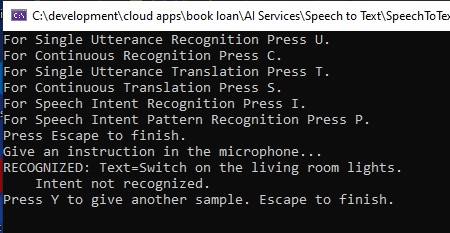
In some attempts to provide spoken input, you may experience that the intent is not recognized. This can be due the following configurations:
The entity {roomName} within thepattern phrase “(Turn | Switch) (on | off) [the] ({roomName}) lights.” is not matched correctly with the entity list.
Below shows the correct lists entries in the pattern matching entity that gave the correct recognition and intent detection:
PatternMatchingEntity.CreateListEntity(
    "roomName", EntityMatchMode.Strict,
    "living room", "dining room", "bed room", "study room",
    "kitchen", "1st bed room", "2nd bed room"
)
If we had defined the list entries without the sub-word “room”:
“living”, “dining”, “bed”, “study”, “kitchen”, “1st bed”, “2nd bed”
The recognised phrase:
“Switch on the living room lights”
Would not be recognized as the word “room” is not included as one of the matched words within the sentence pattern.
Test 2. Phrase: “Set the television volume level five.”
Intent: “AdjustVolumeLevel”Phrase
Pattern: “(Set | Adjust) [the] ({applianceName}) volume level ({volumeLevel}).”
In the first spoken phrase, the session output is shown below:
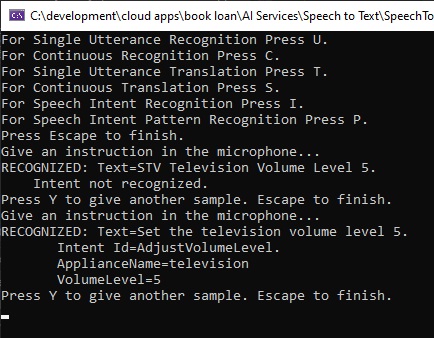
The first attempt has been successfully recognised with the intent captured correctly.
Below is a debug snapshot showing the IntentRecognitionResult instance with the IntentId, Entities and Text properties:
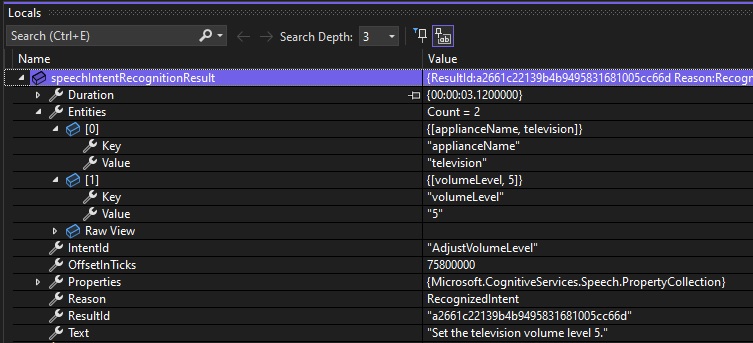
There are cases where the above phrase and intent can fail to be recognized. Apart from the obvious mispronunciation of each word in the phrase pattern, there are cases where the definition of the pattern can lead to the same preposition, to, or the verb, be, being unintentionally recognized as a number of a letter.
For example, the pattern phrase below has the preposition [to, to be] before the {volumeLevel} entity:
“AdjustVolumeLevel”, “(Set | Adjust) [the] ({applianceName}) volume level [to] ({volumeLevel}).”
When the following phrase is spoken in the microphone:
“Set the television volume level to 5.”
The recognized output shows as:
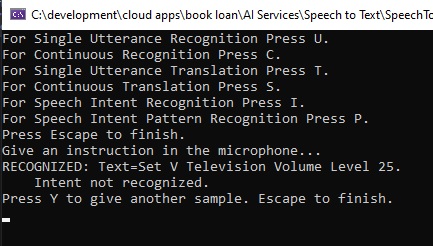
We can see that the preposition to is translated to the number 2 and it is combined with the volume level 5 to be the number 25, which is not what we meant.
In addition, the recognition fails to match a mispronunciation of the definite article, the. When we pronounce the as va, the output is the. But when we pronounce the as vee, the output is V, which is inaccurate.
When the following phrase is spoken in the microphone:
“Set the television volume level to be 5.”
The recognized output shows as:
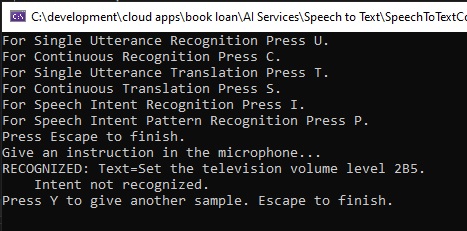
When the word to be, which is a definite article and noun, are spoken before the {volumeLevel} entity, it is literally translated to the alphanumeric word, 2B, and when combined with the spoken volume level entity value, 5, the resulting match is 2B5, which is an inaccurate recognition.
If we use the following speech pattern:
“(Set | Adjust) [the] ({applianceName}) volume level (to | to be) ({volumeLevel}).”
And utter the phrase:
“Set the television volume level to be 5.”
Then the output shows as follows:
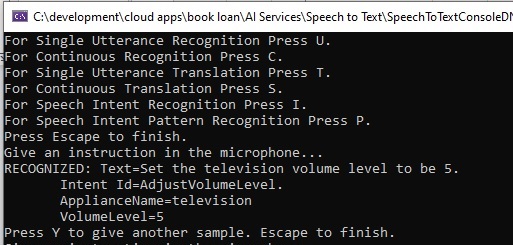
To get the above outcome, you need to ensure that the two words to and be, are uttered as closely together as possible, or else you will end up having the text recognized as 2B.
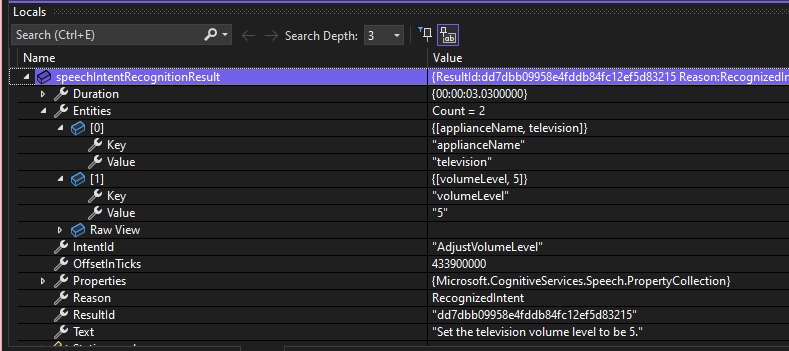
Below is a debug snapshot showing the IntentRecognitionResult instance with the IntentId, Entities and Text properties:
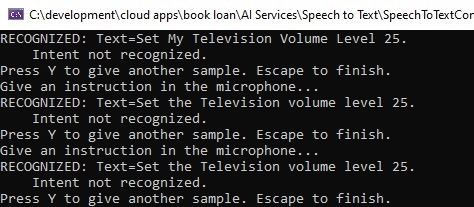
On the other hand, if we were to utter the phrase:
“Set the television volume level to 5.”
Then the output would show as follows:
The optimal pattern for the above phrase is:
“(Set | Adjust) [the] ({applianceName}) volume level [to be] ({volumeLevel}).”
Test 3. Phrase: “Adjust the air conditioner temperature 25”
Intent: “AdjustVolumeLevel”
Phrase Pattern: “(Set | Adjust) [the] ({applianceName}) volume level ({volumeLevel}).”
In the above spoken phrase, the session output is shown below:
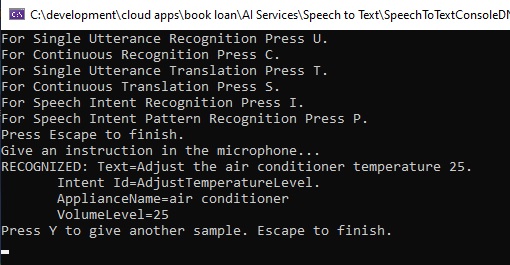
Below is a debug snapshot showing the IntentRecognitionResult instance with the IntentId, Entities and Text properties:
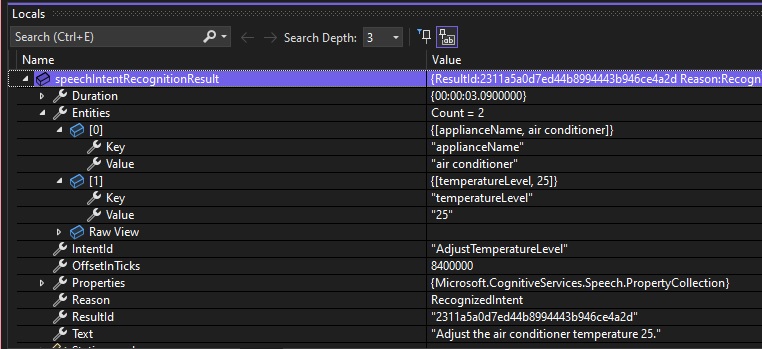
There are some scenarios where, including additional words before or after entity parameters in the phrase pattern can cause inaccurate recognition results. I will explain these two scenarios.
If we were to set the phrase pattern to:
(Set | Adjust) [the] ({applianceName}) temperature ({temperatureLevel}) degrees.
then utter the following sentence in the microphone input:
“Adjust the air conditioner temperature to 25 degrees.”
The resulting recognized text will show below without the intent being recognized:
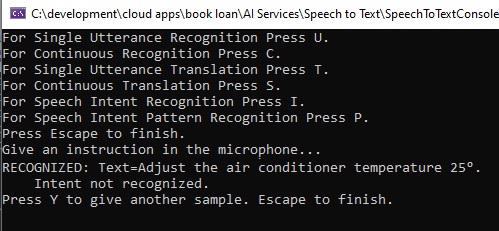
Can you spot why the intent was not detected?
The reason is that the word we had attempted to match, degrees, is literally translated to the degrees character,
°
And not keep the spoken word degrees in the recognized text.
To avoid the above recognition issue, we simplified the pattern to not include the to and be words and the trailing degree word.
Another possible cause of non-recognition of entities is when we use a hyphen in the entity value. The following variation of air conditioner:
air-conditioner
Will not be recognized, but the following form:
air conditioner
Will be correctly recognized.
Test 4. Phrase: “ Open the living room blinds.”
Intent: “AdjustVolumeLevel”
Phrase Pattern: “({action}) [the] ({roomName}) (blinds).”
In this example, we have an action entity and an object entity in the same sentence pattern.
In the above spoken phrase, the session output is shown below:
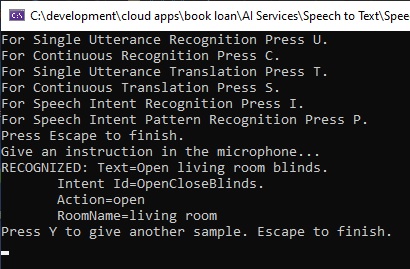
Below is a debug snapshot showing the IntentRecognitionResult instance with the IntentId, Entities and Text properties:
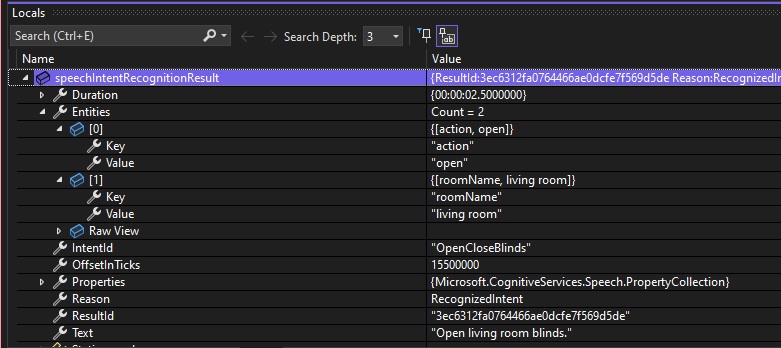
You can get the idea from the above sessions, what sentence patterns you require to get successful recognitions of speech intent. Also, the sentence patterns specified in the language model are specific to English in this case. In other languages, the patterns you use will very when the sentence grammar structures vary with respect to ordering of subject, verb, and object.
Given from what we have seen from the above, the delivery of our enunciation of the phrases needs to be accurate in relation to the spacing between some words, otherwise we will get inaccurate recognition results being output. This can be improved by adding different variations of pronunciations of important words into the model, so that it is trained to recognize the nuances not just in word pronunciations, but spacing delivery between words. Recognizing these limitations is what can allow us to make improvements and tune our language model to our requirements.
In future posts, I will explore how to train online language models to improve the phrases we use be recognized more consistently.
That is all for today’s post.
I hope that you have found this post useful and informative.

Andrew Halil is a blogger, author and software developer with expertise of many areas in the information technology industry including full-stack web and native cloud based development, test driven development and Devops.

