

Welcome to today’s post.
In today’s post I will be showing you how to train and test a custom Conversational Language Understanding (CLU) Model language model within the Azure Language Studio.
In a previous post, I showed how to create a CLU model within the Azure Language Studio.
The initial model that we have created has not been trained or tested, so it is likely that there will be issues with the dataset that has been used to train the model.
Some of the issues that could occur from not using untrained or inaccurate datasets include:
- Insufficient variety of utterances within the dataset that does not covers the variations in entities and intents.
- Size of dataset does not give a wider variety of utterances that can be used to train and test the model.
- Inaccurately labelled entities in utterances cause mismatches between utterances and intents.
- Defining entities with common words confuses the model when associating entities to intents.
- Defining intents with common sentence structures confuses the model when associating intents to utterances.
- Missing entities or intents occur in training or test data after the dataset is split into training and test data.
With a greater number of utterances within the training data, most of the above issues will be resolved and a greater confidence rating will be returned for each labelled utterance in the dataset.
I will cover the steps required to rectify and remediate the data so that.
I will first show how we run a typical training and testing run on the dataset we have setup from the previous post.
Starting a Training and Testing Run on a CLU Model
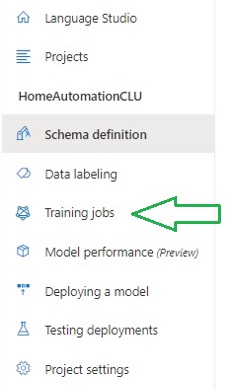
To start a training run, we select the menu option Training jobs on the left menu panel.
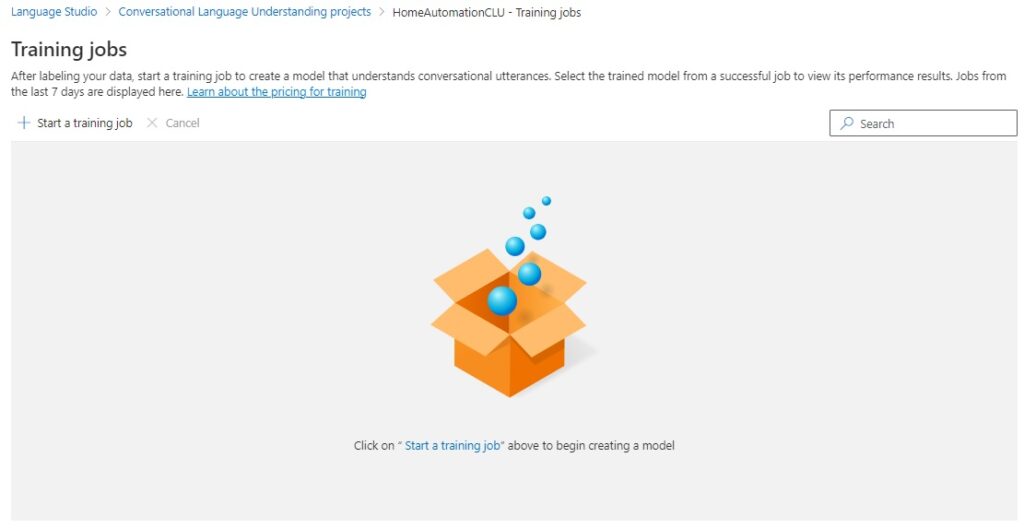
In the training jobs page that opens, initially you will see no training jobs displayed for the first time. To start a training job, select the option Start a training job above the main panel.
In the parameter screen that displays, there are a few parameters and options that will need to be selected before a training job can be run.
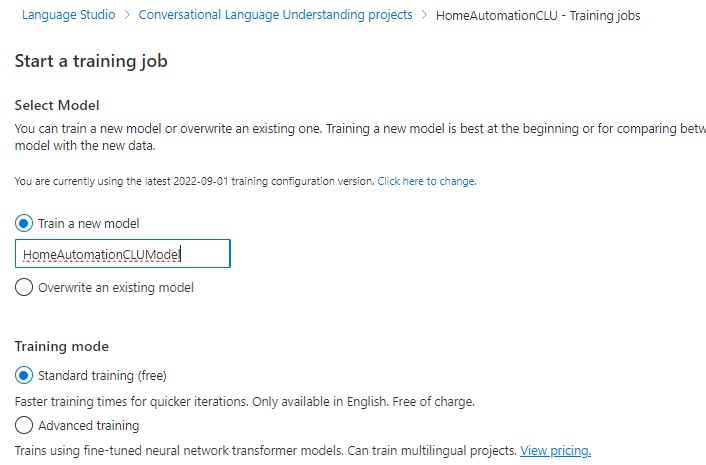
In the first options below, you select to train a new model or overwrite an existing model:
Train a new model
Overwrite an existing model
In the Training mode options below, you select standard training or advanced training:
Standard training (free)
Advanced training
With standard training, the training time is faster, for simpler scenarios, which is only available in English. This option is free.
With advanced training, the training uses neural networks and can include multiple languages. This option is priced.
Below the training mode, you will notice another option, which is the data splitting, which allows you to specify a percentage of the total dataset that is allocated to training the model, and a percentage of the total dataset that is allocated to testing the model.
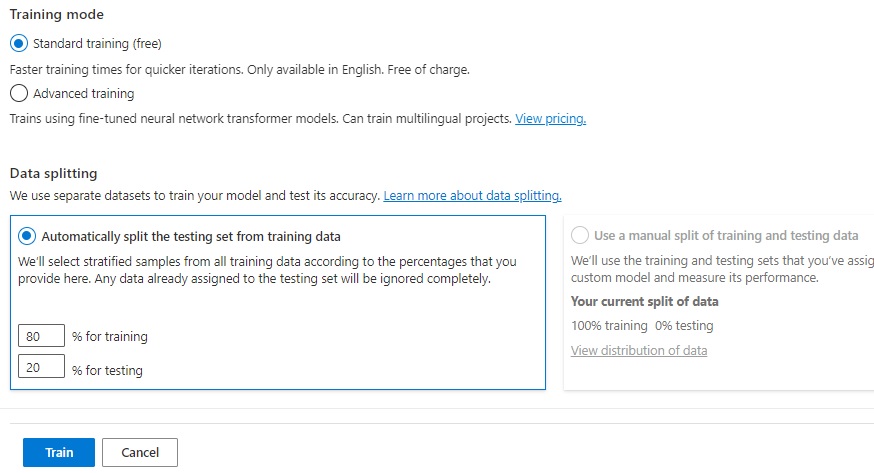
Be aware that splitting the dataset into training and testing allocations may result in an insufficient number of records allocated towards either training or testing or both. I will show later how to resolve this.
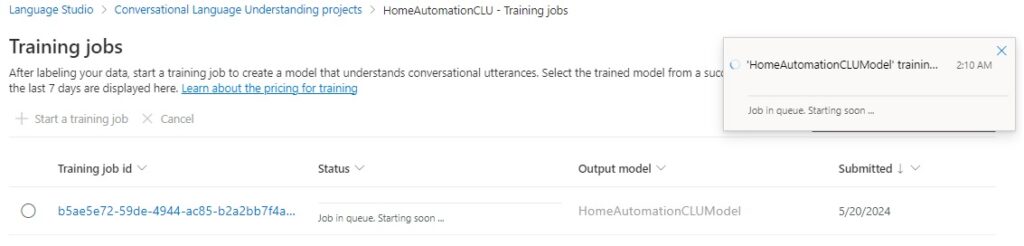
After submitting the training and test job, the status will display in the display grid panel with a job identifier and output model.
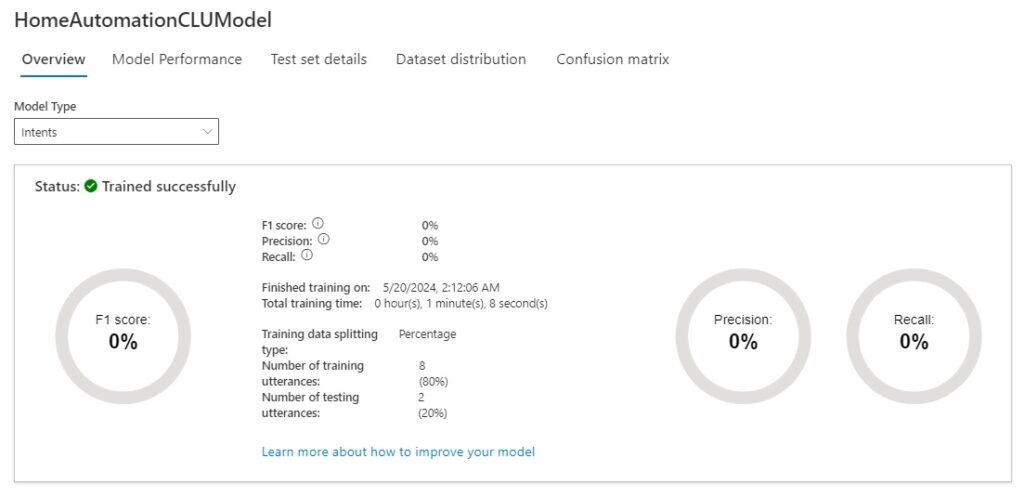
After the training job completes, the model for intents and entities overview will show the time taken for the training, percentage success for the F1 scores, precision, and recall. The number of training and testing utterances will also be displayed with the data splitting percentages.
Below is the model performance for the intents model type:
Below is the model performance for the entities model type:
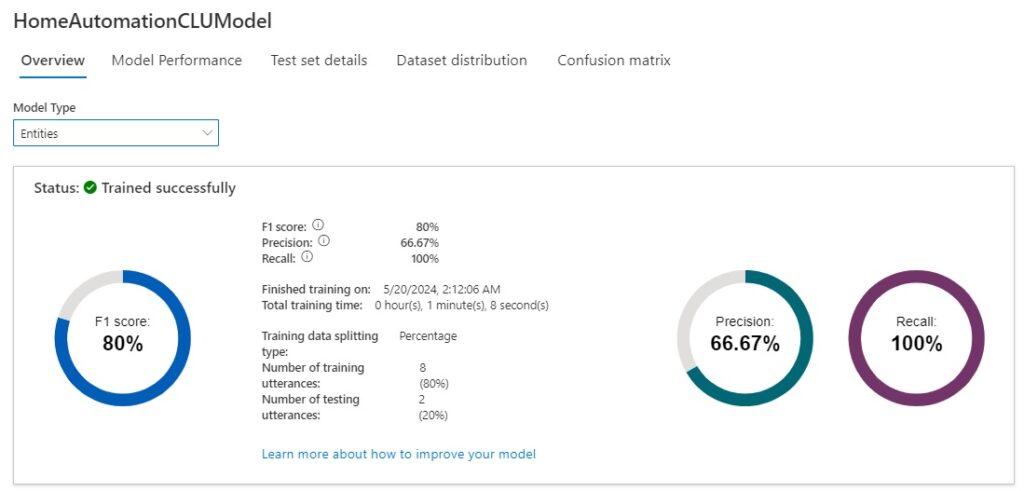
As we can see from the above scores, the intents model scored poorly in the test run, whereas the entities model scored reasonably.
Understanding the Model Performance Scores
As we can see from the scores in the model performance dashboard, we scored nothing, zero, for the intents model performance, and 80% for the entities model performance.
By looking at the issues we can iron out the issues for both model types, re-run the training and true test jobs on the data hopefully, the performance scores improve.
The scores and percentages that are on the performance dashboard are based on four different types of test results when compared to a condition: true positive, true negative, false positive, and false negative. I will explain what each type of test condition means.
A false positive is a false test result that occurs when the condition is present.
In the following utterance:
Open the living room blinds.
In the intent evaluation for LightAction, the model test predicts the intent as LightAction, but the actual intent is BlindsActions. Because the intents LightAction and BlindsActions share common words, the prediction by the model is not always accurate, which results in a false positive result.
In the intent evaluation for BlindsActions, the model test predicts the intent as BlindsActions, with the actual intent also BlindsActions, which results in a true positive result.
A false negative is a false test result that occurs when the condition is not present.
In the following utterance:
Close the corridor lights.
In the intent evaluation for BlindsActions, the model test predicts the intent as LightActions, but the actual intent is BlindsActions. which results in a false negative result.
When more tests return as false positives, the precision, which is a measure of how precise/accurate our model is defined as:
Precision = #True_Positive / (#True_Positive + #False_Positive)
When more tests return as false negatives, the recall, which is a measure of the model’s ability to predict actual positive classes, is defined as:
Recall = #True_Positive / (#True_Positive + #False_Negatives)
The F1 score is defined as:
F1 Score = 2 * Precision * Recall / (Precision + Recall)
The tests of the model are conducted on the utterances within each intent and entity, and the tally of true positive, false positive, and false negative is added towards the final model performance scores for intent and entity model types.
Resolving issues with Intent model types
Below the above model overviews there is a guidance, which when followed will improve each model type’s accuracies.
For the intents model type, the issues and recommendations are:
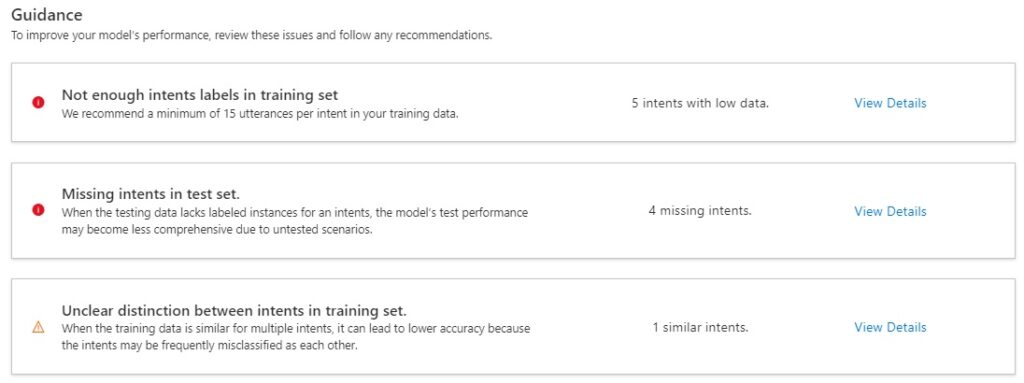
Not enough intents labels in training set
When viewing the details of this issue, you will see the issue and recommendations. The recommendation for insufficient intents in the training set is to add more utterances for each intent.
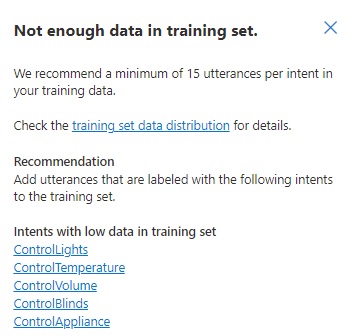
For example, the intent ControlLights I have the following initial utterances:
Open the living room lights
Close the living room lights
Open the bedroom lights
Close the bedroom lights
Open the dining room lights
Close the dining room lights
We add additional utterances to meet the minimum number required for successful training:
Close the study room lights
Open the study room lights
Close the living room lights
Open the living room lights
I want to close the bedroom lights
I want to open the living room lights
I want to close the study room lights
I want to open the study room lights
I want to open the bedroom lights
I want to close the living room lights
Can you open the bedroom lights?
Can you open the living room lights?
Can you open the study room lights?
Can you close the bedroom lights?
Can you close the living room lights?
Can you close the study room lights?
The variations I have added are different ways of phrasing the same meaning using past, present, future tenses, and first, second, third person perspectives.
Missing Intents in test set
When viewing the details of this issue, you will see the issue and recommendations.
The recommendation for missing intents in the test set is to add more utterances for each intent that are in the test set. Given the data split is 80:20, with 4 utterances defined for an intent, we would get a 3:1 or 4:0 split of training to test data, which can result on zero utterances defined for the intent in the dataset used for testing.
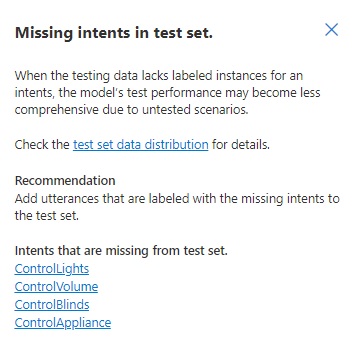
We are likely to get the above issue whenever the number of defined intents in the dataset exceeds the number of utterances from the dataset are selected for testing.
The recommended action is to add additional utterances and associate them with intents that have insufficient entries in the test dataset.
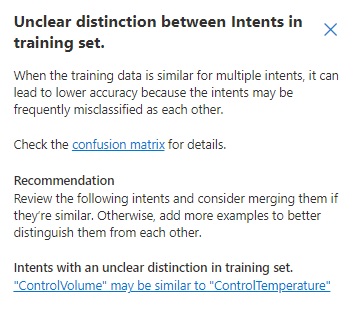
Unclear distinction between Intents in training set
When viewing the details of this issue, you will see the issue and recommendations.
The recommendation for unclear distinction between intents in the training set is to merge similar intents or add more utterances to distinguish between the intents.
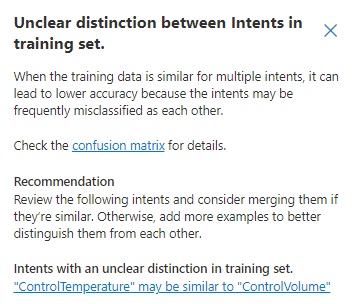
With the above intents, we have two and three records respectively:
ControlTemperature
Decrease the air conditioner temperature
Increase the air conditioner temperature
ControlVolume
Decrease the radio volume
Increase the radio volume
Increase the television volume
What you can notice is that the utterances in each intent share the same sentence syntax structure, with common actions applied to an object. The model is not trained to distinguish the words temperature and volume as distinct entities, so it is confused when distinguishing membership of the utterances within the ControlTemperature and ControlVolume intents. We can merge the above intents into one common intent: ControlTemperatureOrVolume and avoid the confusion. Alternatively, we can add additional utterances to each intent like:
I want to increase the air conditioner temperature.
Can you decrease the air conditioner temperature?
We want to increase the television volume.
I want the television volume increased.
Which would give more diversified training sets for each intent.
Resolving issues with Entity model types
For the entities model type, the issues and recommendations are:
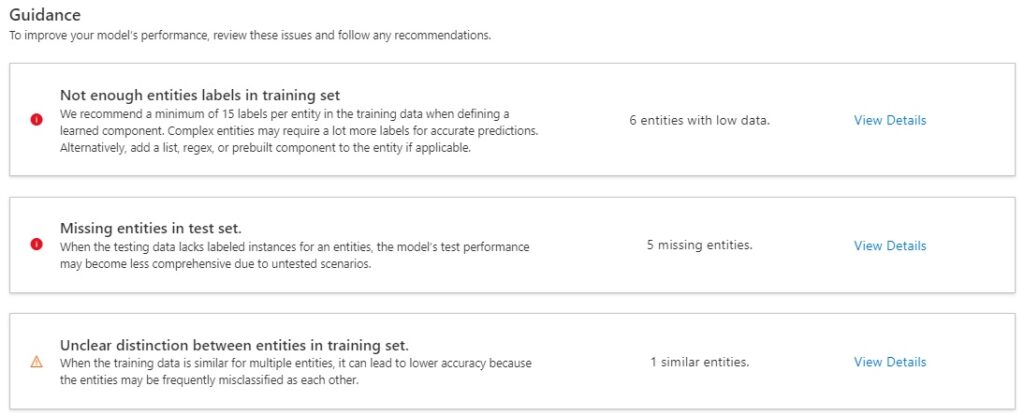
Not enough Entities labels in training set
When viewing the details of this issue, you will see the issue and recommendations.
The recommendation for insufficient entities in the training set is to add more utterances for each entity.
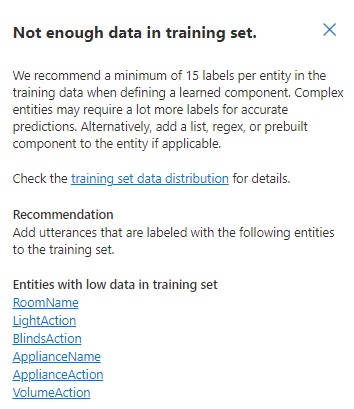
When we added extra utterances to the intent ControlLights, as shown:
Close the study room lights
Open the study room lights
Close the living room lights
Open the living room lights
I want to close the bedroom lights
I want to open the living room lights
I want to close the study room lights
I want to open the study room lights
I want to open the bedroom lights
I want to close the living room lights
Can you open the bedroom lights?
Can you open the living room lights?
Can you open the study room lights?
Can you close the bedroom lights?
Can you close the living room lights?
Can you close the study room lights?
The additional utterances have expended the labels of the entity LightAction of the words close, open and from6 to 16 utterances. The same applies to the entity RoomNames of the words study room, living room, bedroom which has also increased the labels from 6 to 16 utterances.
Missing Entities in test set
When viewing the details of this issue, you will see the issue and recommendations.
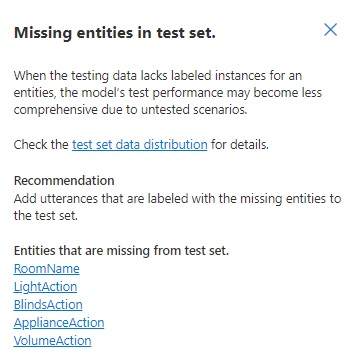
The recommendation for missing entities in the test set is to add more utterances for each entity that are in the test set. Given the data split is 80:20, with 4 utterances defined for an entity, we would get a 3:1 or 4:0 split of training to test data, which can result on zero utterances defined for the entity in the dataset used for testing.
As we did in the section missing intents in test set, we add additional utterances that reference the missing entities. Increasing the number of utterances from 4 to the minimum 15 in an intent, would give us a minimum of 3 utterances in the allocated test run.
Unclear distinction between Entities in training set
When viewing the details of this issue, you will see the issue and recommendations.
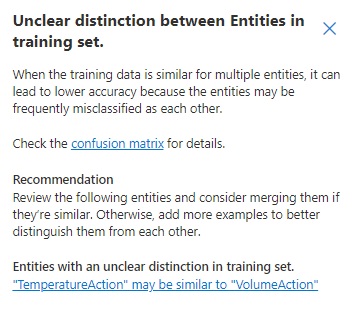
The recommendation for unclear distinction between intents in the training set is to merge similar intents or add additional utterance with references to the indistinguishable entities, as mentioned in section unclear distinction between intents in training set. Both strategies will help the model distinguish between entities with higher levels of confidence.
Applying the recommended actions to the initial dataset
Merging entities
Based on the above recommendations, I have merged the two entities:
VolumeAction, VolumeActionList: Increase, Decrease
TemperatureAction, TemperatureActionList: Increase, Decrease
to
VolumeOrTempAction, VolumeOrTempActionList: Increase, Decrease, Raise, Reduce, Increased, Decreased, Raised, Reduced
And merged the following entities:
BlindsActions, BlindsActionList: Open, Close
LightAction, LightActionList: Open, Close
to
LightOrBlindsAction, LightOrBlindsActionList: Open, Close, Opened, Closed
Adding additional Utterances to each Intent
To reach the minimum number of recommended utterances for each intent, additional utterances were added to each of the intents. Below are each intent and the utterances that have been added. In bold are the words that have been labelled as words within entities:
ControlTemperature
Decrease the air conditioner temperature
Increase the air conditioner temperature
Reduce the air conditioner temperature
Raise the air conditioner temperature
I want to decrease the air conditioner temperature
I want to increase the air conditioner temperature
Can you decrease the air conditioner temperature?
Can you increase the air conditioner temperature?
I want to reduce the air conditioner temperature
I want to raise the air conditioner temperature
Can you reduce the air conditioner temperature?
Can you raise the air conditioner temperature?
I want the air conditioner temperature increased
I want the air conditioner temperature decreased
I want the air conditioner temperature raised
I want the air conditioner temperature reduced
Can I have the air conditioner temperature reduced?
Can I have the air conditioner temperature raised?
Can I have the air conditioner temperature decreased?
Can I have the air conditioner temperature increased?
ControlVolume
Decrease the radio volume
Increase the radio volume
Increase the television volume
Reduce the radio volume
Raise the radio volume
Decrease the television volume
Reduce the television volume
Raise the television volume
I want to decrease the radio volume
I want to increase the radio volume
I want to increase the television volume
I want to decrease the television volume
I want the television volume increased
I want the television volume decreased
I want the television volume raised
I want the television volume reduced
I want the radio volume raised
I want the radio volume reduced
Can you increase the radio volume?
Can you decrease the radio volume?
Can you increase the television volume?
Can you decrease the television volume?
Can you raise the radio volume?
Can you reduce the radio volume?
Can you raise the television volume?
Can you reduce the television volume?
ControlAppliance
Switch off the radio
Switch on the television
Switch off the television
Switch on the radio
Turn off the television
Turn on the radio
I want to switch off the radio
I want to switch on the television
I want to switch on the radio
I want to switch off the television
I want to turn off the radio
I want to turn on the television
I want to turn on the radio
I want to turn off the television
Can you turn on the radio?
Can you turn off the television?
Can you switch on the radio?
Can you switch off the television?
ControlBlinds
Open the bedroom blinds
Close the living room blinds
Open the living room blinds
Close the bedroom blinds
Open the study room blinds
Close the study room blinds
I want to open the living room blinds
I want to open the bedroom blinds
I want to open the study room blinds
I want to close the living room blinds
I want to close the bedroom blinds
I want to close the study room blinds
Can you open the living room blinds?
Can you open the bedroom blinds?
Can you open the study room blinds?
Can you close the living room blinds?
Can you close the bedroom blinds?
Can you close the study room blinds?
Can I have the living room blinds closed?
Can I have the living room blinds opened?
Can I have the bedroom blinds closed?
Can I have the bedroom blinds opened?
Can I have the study room blinds closed?
Can I have the study room blinds opened?
ControlLights
Close the bedroom lights
Open the living room lights
Close the study room lights
Open the study room lights
Open the bedroom lights
Close the living room lights
I want to close the bedroom lights
I want to open the living room lights
I want to close the study room lights
I want to open the study room lights
I want to open the bedroom lights
I want to close the living room lights
Can you open the bedroom lights?
Can you open the living room lights?
Can you open the study room lights?
Can you close the bedroom lights?
Can you close the living room lights?
Can you close the study room lights?
Re-training the Model with the Improved Dataset
After we have applied the optimizations to the dataset, we are ready to run another training job to train and test the model.
The first review the breakdown of the number of utterances per intent and the referenced entities for each intent from the Schema definition.
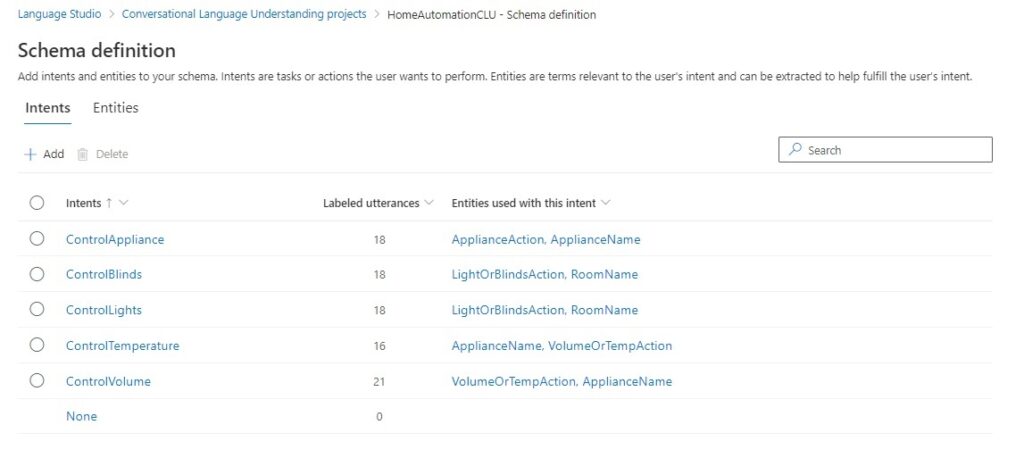
The referenced entities also include the entities that we merged to make them easier to associate an utterance with an intent.
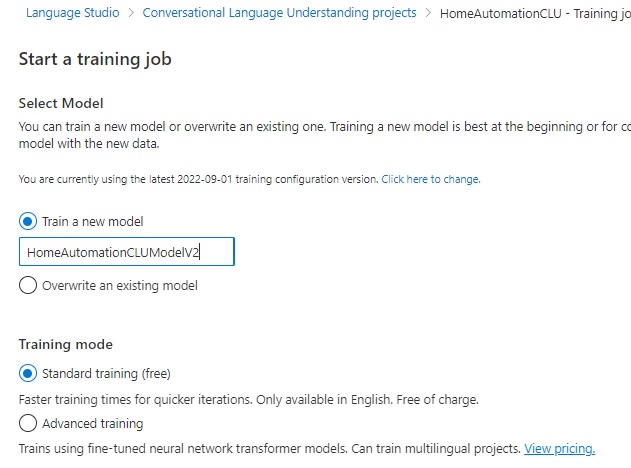
What I have done here is to start a training run with a new model.
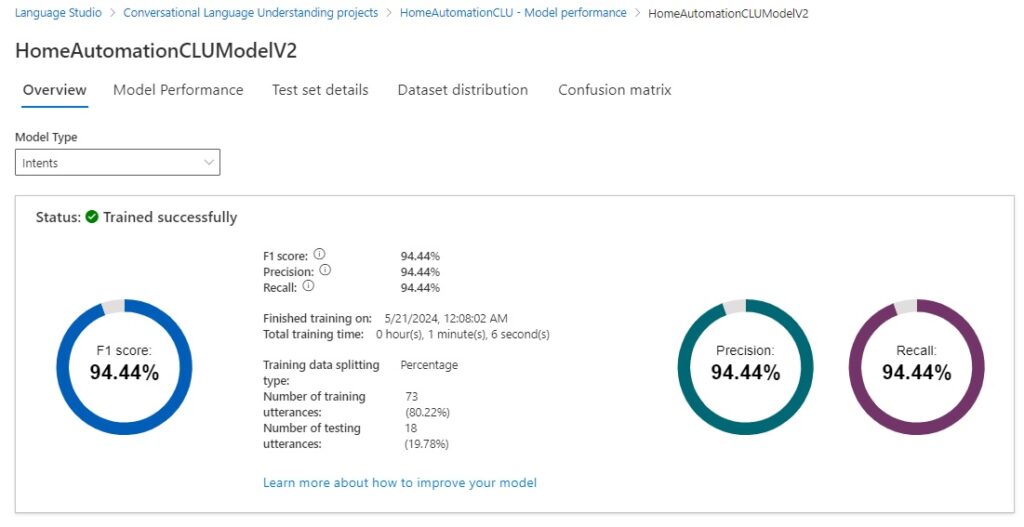
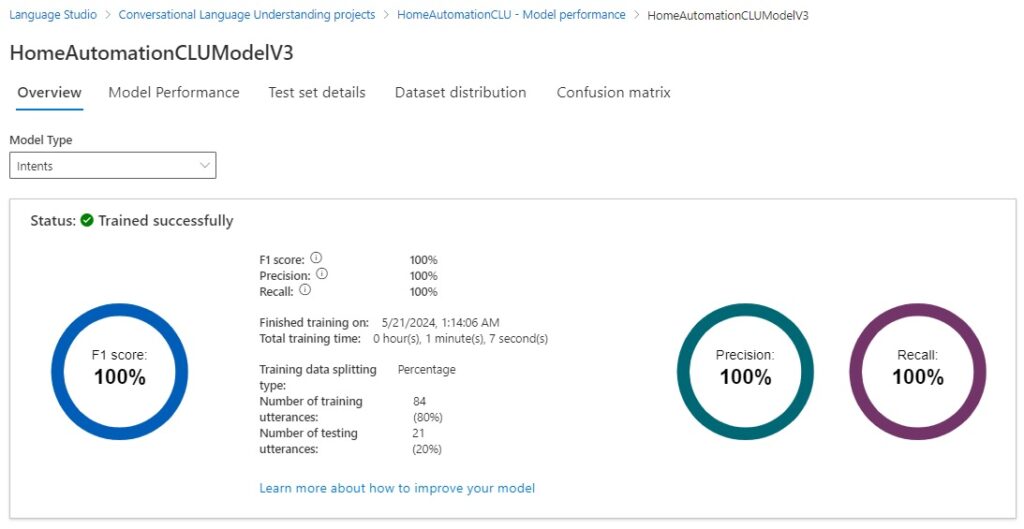
When the training job completes, the results of the training job for the intent model types show a significant improvement from the initial training run.
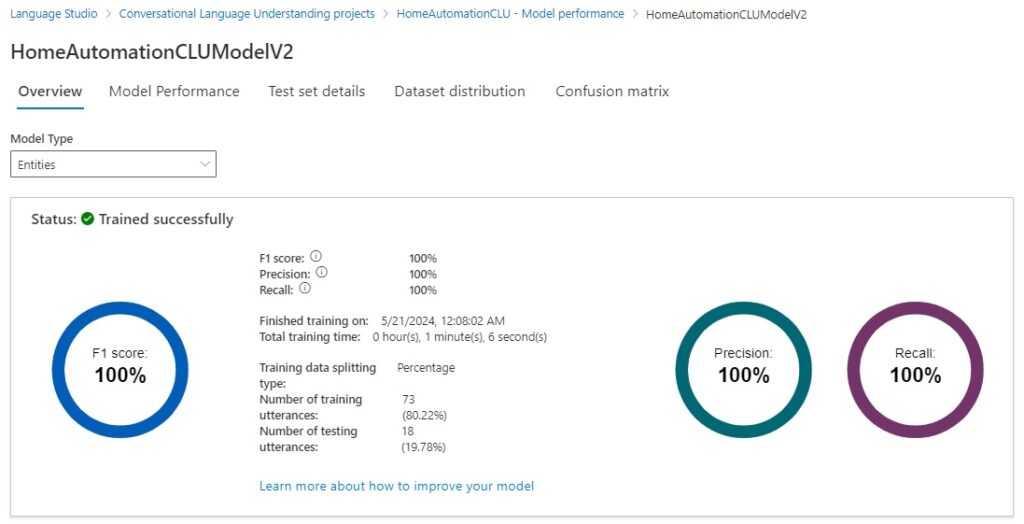
The results of the training job for the entity model types show an improvement from the initial training run.
The recommendations for the intent model are shown below:
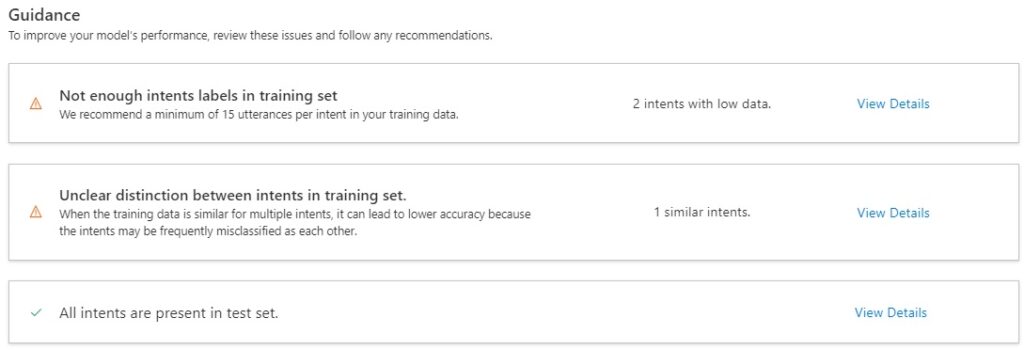
With the first recommendation, there is still insufficient data in the training set after data splitting:
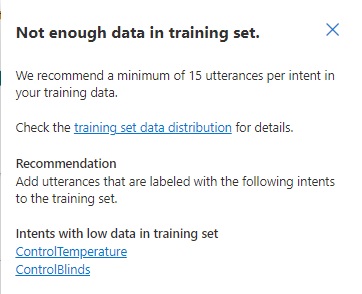
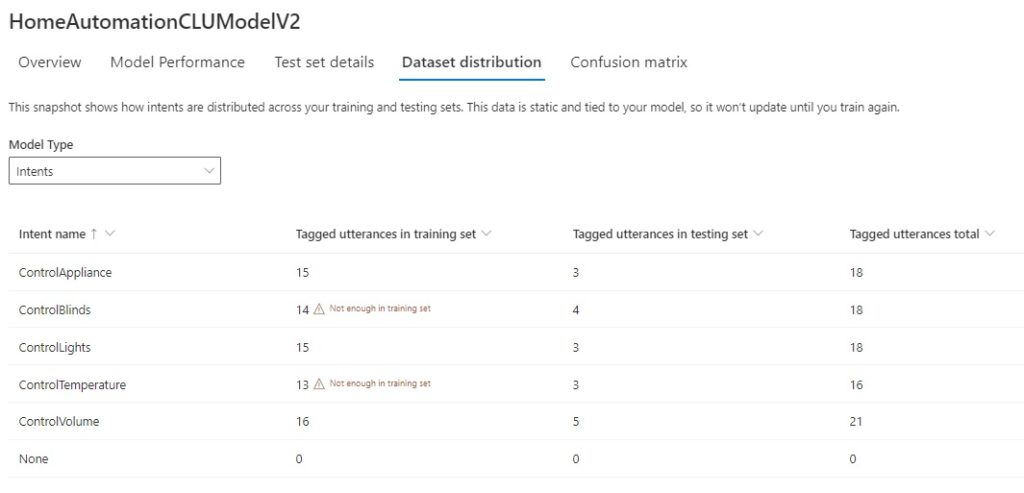
When we review the training set data distribution of the training and test data sets, there are only two issues left to resolve in relation to the sufficiency of data with intent models.
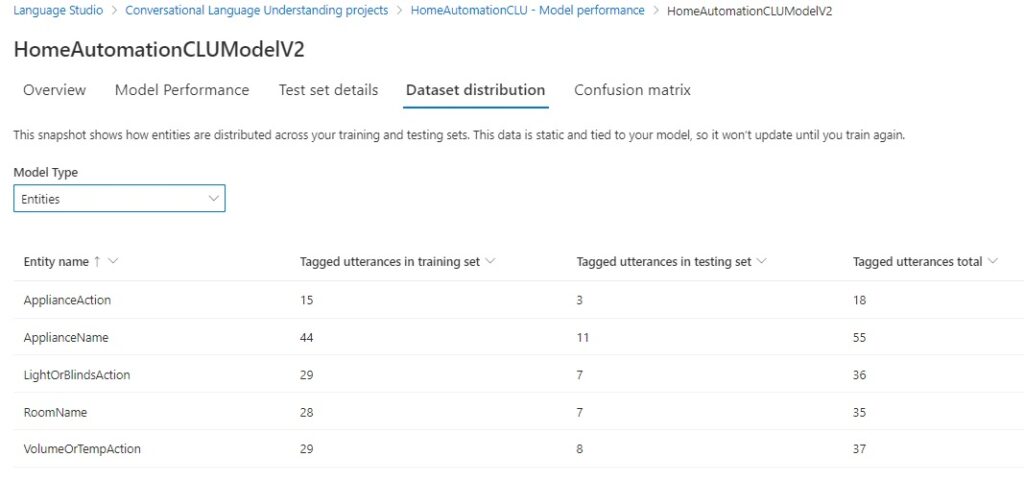
When we review the data distribution of the training and test data sets, there are no issues in relation to the quantity of data with entity models.
Reviewing the test set details will show any tests that did not result in a true positive outcome.
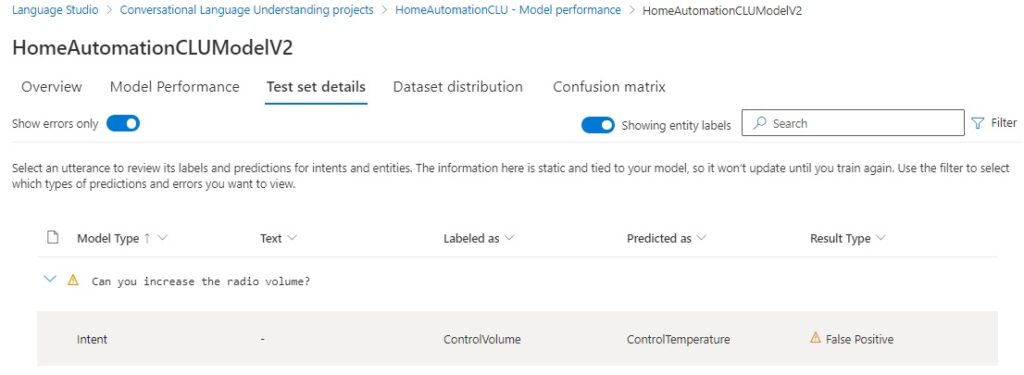
In the above test, we saw the utterance:
Can you increase the radio volume?
This was incorrectly predicted as a ControlTemperature intent because we used two entities, TemperatureAction and VolumeAction with lists with identical members Increase and Decrease, which caused the model confusion when identifying the intent.
If we open the ControlBlinds intent that is flagged as an issue from the Dataset distribution, we will notice the following problem:

By incorrectly labelling a room name as the ApplianceName entity, what we did was cause the ControlBlinds intent to be inaccurately referenced with an ApplianceName entity. As most of the utterances in the ControlBlinds intent has the room name labelled correctly, this inaccuracy would be detected by the model as an anomaly.
Another tool to use to resolve ambiguities between intents is the confusion matrix, which is accessible from the link in the recommendations under each model performance report.
The confusion matrix for the intent model is shown below, with the error matrix view:
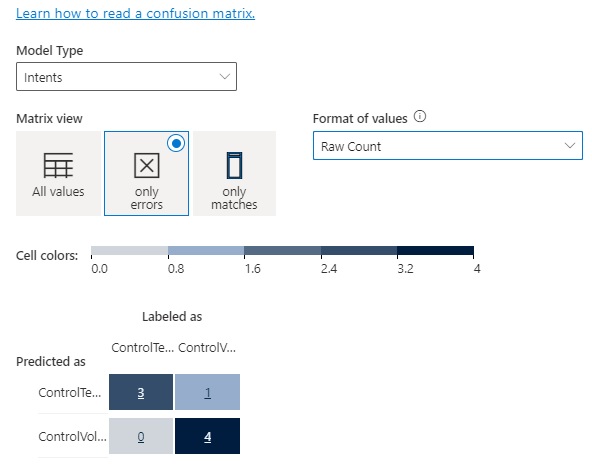
The single row and column entry coinciding with mismatching predicted and labelled intents shows that by merging entities that share the same lists avoids the confusion during testing as there is only one entity to choose from instead of two identically defined entities.
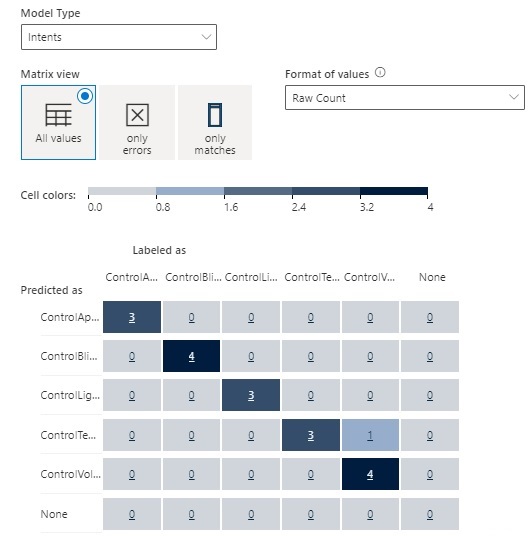
In the previous section Understanding the Model Performance Scores, where I explained how the model performance was determined by the number of true positives, false positives, and false negatives, the confusion matrix tells us exactly which test counts within the grid cells are true positives, false positives, and false negatives.
In the confusion matrix below, the diagonal entries are all true positives. All the values in the rows excluding the diagonal are false positives. As we saw earlier, the ControlTemperature intent was incorrectly predicted in the ControlVolume intent test.
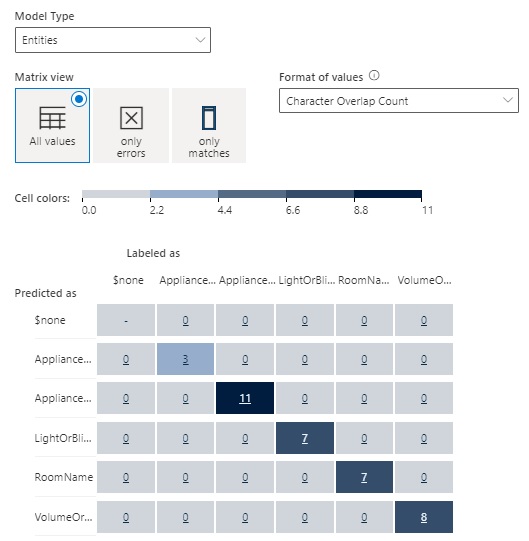
The confusion matrix for entity models showed no tests in error since the entity model performance scored 100%.
With more labelled utterances and merged entities, the schema definition looks like this:
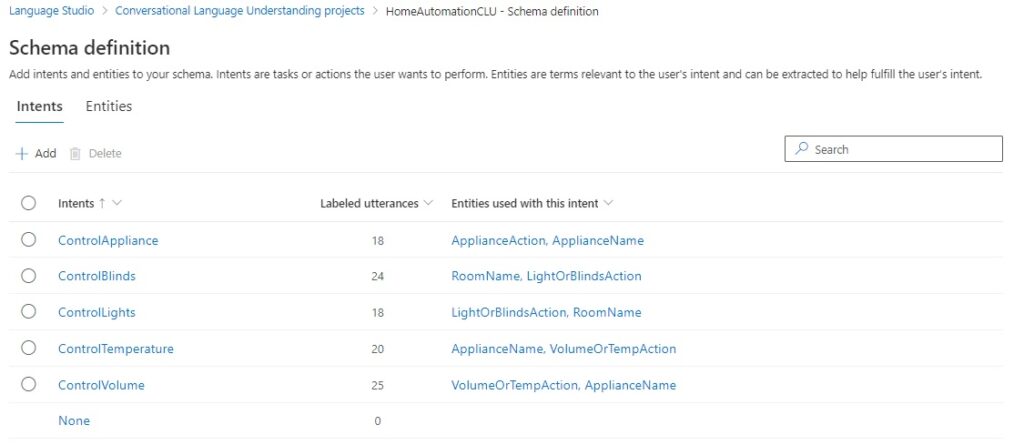
We can see if the improvements yield better model performance. Starting a new training job.
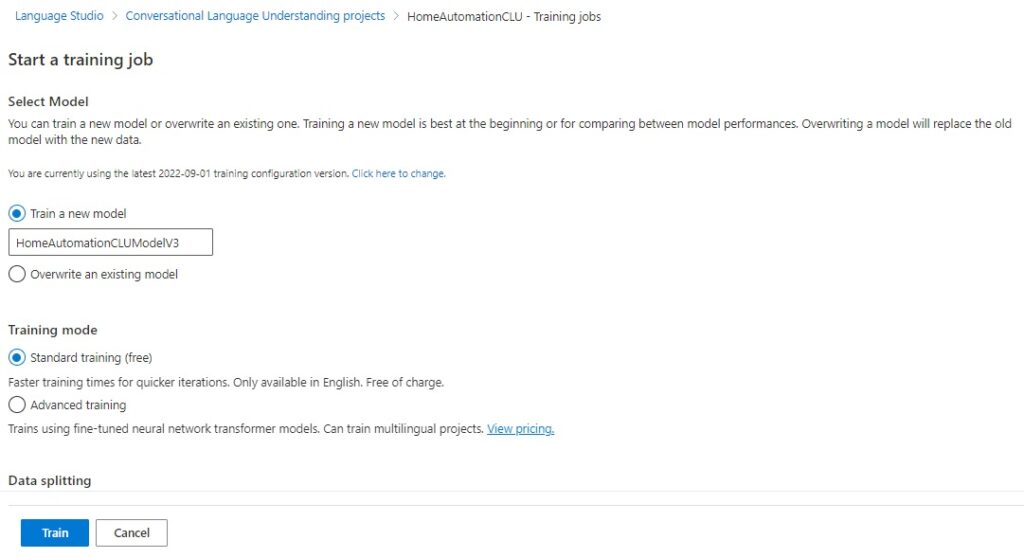
We can see that the intent model type now scores 100%.
And entities models score 100%.
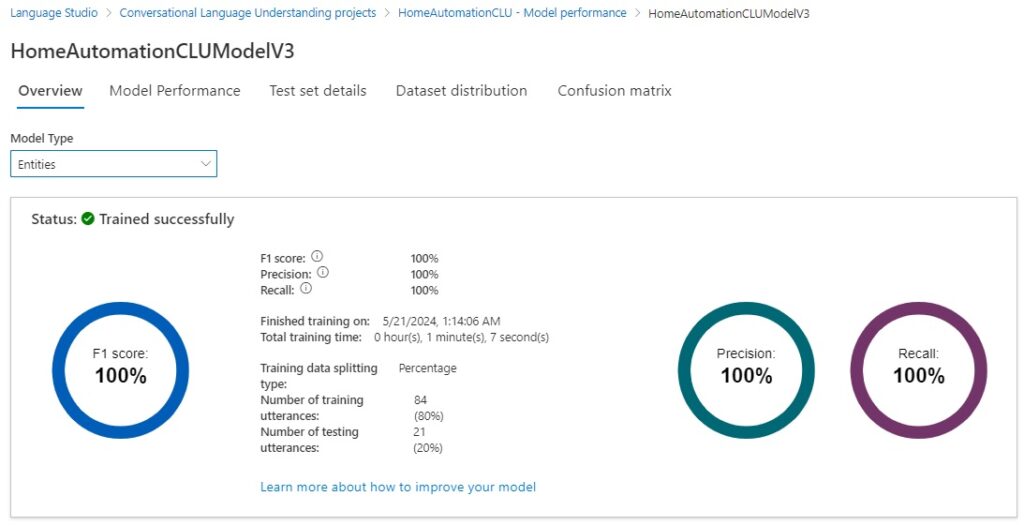
The prediction and recall scores are both 100%.
Deploying the Model and Testing the Deployment
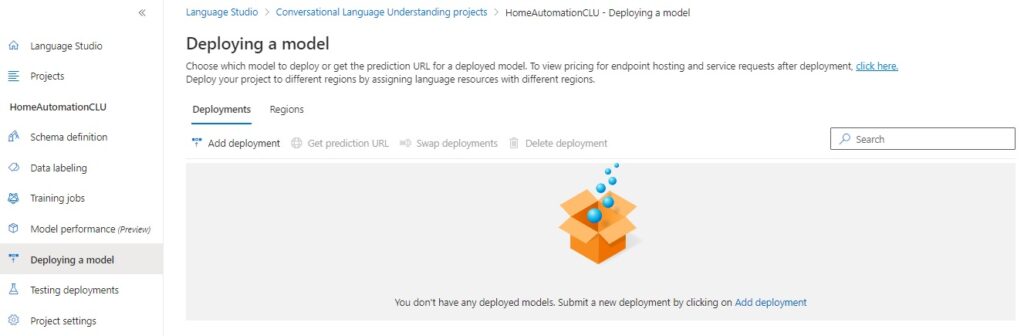
To deploy the model, select the Deploying a model menu option.
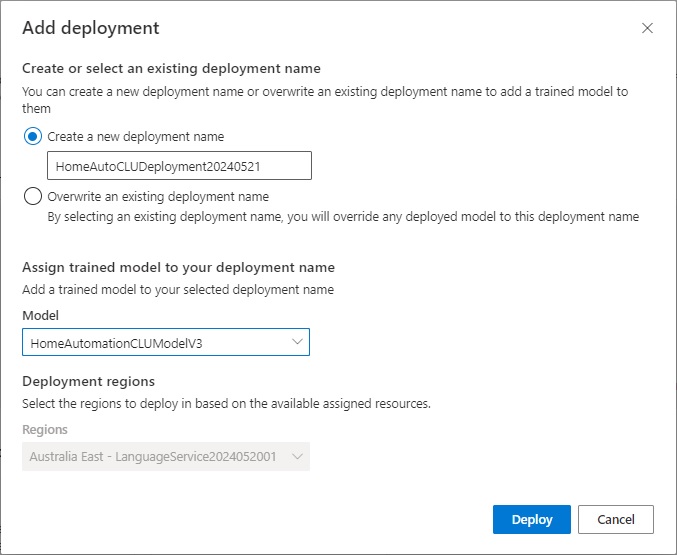
After clicking on the Add deployment action, you will see the Add deployment screen, where you will need to either enter a new deployment name or overwrite an existing one, and select which model to deploy:
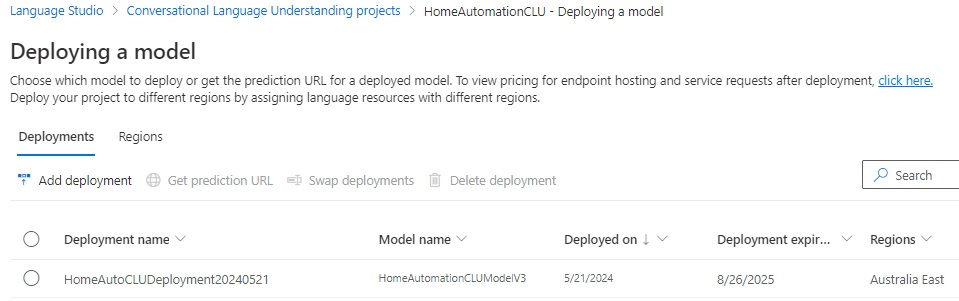
Once deployed, and if successful, you will see the deployment listed below:
Next, select the menu option Testing deployments, where you will see a form that allows you to select a deployment name, some text.
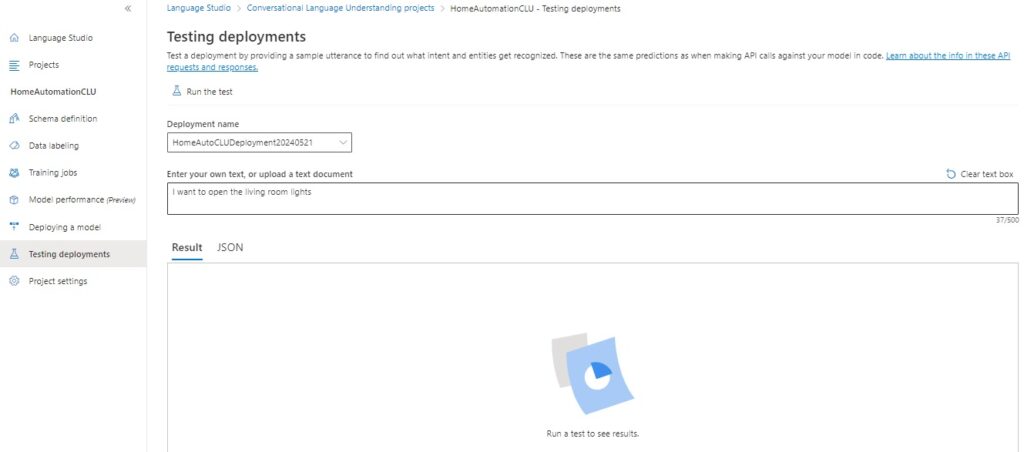
To execute the test, click on the action Run the test.
The results will show in the Result section.
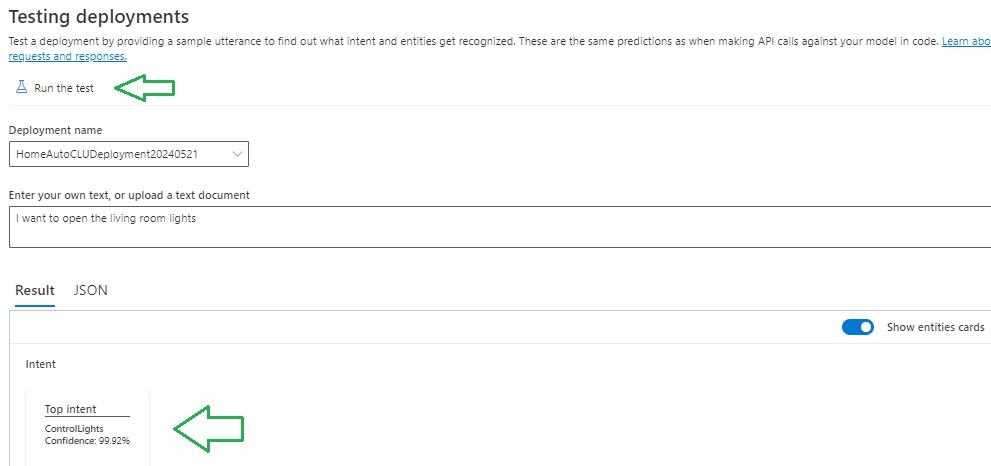
The results will show the top intents by percentage.
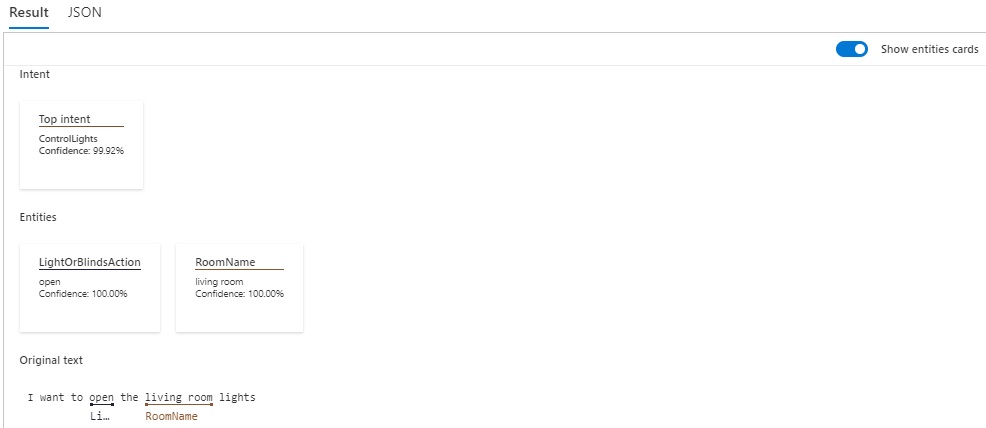
The above has shown how to train and test a custom CLU model, refine the model, and interpret the results of the model performance. From the above we can improve any language model by correctly labelling entities within our utterances, merge duplicated entities, and add extra utterances to give our model more examples to learn from and improve on its performance.
That is all for today’s post.
I hope that you have found this post useful and informative.

Andrew Halil is a blogger, author and software developer with expertise of many areas in the information technology industry including full-stack web and native cloud based development, test driven development and Devops.

