

Welcome to today’s post.
In today’s post, I will be explaining what speech intent is and how to use it in an application.
Within this post, I will be using Azure AI Speech Services to recognize spoken speech and to apply pattern matching on the recognized speech text to determine the intended actions of the speaker.
In previous posts, I showed how to use the Azure AI Speech SDK to recognize speech from prerecorded sound files and then recognize speech from a microphone sound source.
In those posts I based the assumption that the sound source language is English.
In the pattern matching rules that I will define, the language used will also be English. You could change this to whatever language you are familiar with and what your machine environment supports.
Determining Speech Intent with Language Models
An intent is an action that the user wishes to perform and is expressed as a vocal expression.
Intents are used in language models to categorize questions and commands that represent the same intention.
The use of pattern matching to determine speech intent is one of the ways in which we can process phrases with the Speech SDK to determine intent. The other way to determine intent is to use a conversational language understanding (CLU) model.
The use of pattern matching is an offline solution to determining intents. The addition of phrases that are matched covers only the cases you need to resolve for a limited real-world case and the nuances that come with different ways in which to deliver the same intent with phrase variations.
Below is a diagram showing how the offline model works by building intents before submitting them as inputs to the intent recognition service:
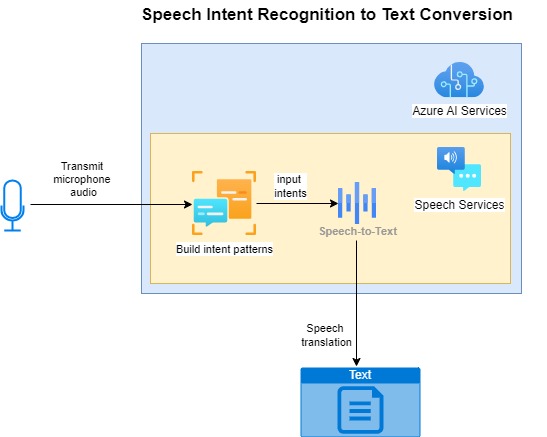
The CLU model makes use of machine learning to determine more accurate intents from training sets consisting of a wider set of phrases.
The use of CLU models to determine phrase intents will be explored in a future post.
Determining Speech Intent
Starting with Basic Phrases
Basic phrases that convey actions include:
“Drive home.”
“Turn on lights.”
“Close the blinds.”
“Turn off fan.”
In each of the above phrases, we can see two parts of the sentence, a verb, which is an action, and an object. The action is applied to the object. The intention of the speaker is to perform or request an action on the object.
Speech recognition alone will not understand the intention of the speaker, we will still have to apply language rules that determine the intention of the speaker.
The above direct instructions that include the action and entity are applied literally and unambiguously determine their intent. We can map each of the above basic phrases directly to one unique action.
Phrases with Pattern Matching
Phrases can be parametrized as speech patterns to include placeholders for the entities (objects) that will be the target of the action. When our speech recognition detects that the sentence matches the phrase pattern, it will determine the entity and the intent. Determining an intent for each phrase requires us to define each phrase pattern with an intention.
Examples of how this is done include the intention “OpenCloseLights”, which is defined with a phrase pattern:
“Switch {action} {roomName} lights.”
The above pattern covers all actions {action} on the object {roomName}. If we had used the following phrase patterns:
“Switch on {roomName} lights.”
“Switch off {roomName} lights.”
The speech recognition intent processor would not be able to distinguish between an on or off action as that has not been parameterized within the pattern, even though we have those words included in the phrases. The above two phrases would match the intent identifier OpenCloseLights, but no action would be determined. The phrase pattern with the two entities should be used to uniquely determine both the action and object.
We can define more variations of the above to give the same intention:
“Switch {action} the {roomName} lights.”
“Switch {action} {roomName} lights.”
And so on. The language parser has detected phrases with the phrase patterns:
“Switch … the … lights.”
“Switch … … lights.”
correspond to the intention “OpenCloseLights”.
A phrase that has a more complex intention would include two different entities. Below is a phrase that has the intention “AdjustVolumeLevel”:
“Adjust {applianceName} volume level to {volumeLevel}.”
With the above, we can match any phrase that has the pattern:
Adjust … volume level to …
to the intention.
The above phrase pattern matching is used in many real-world applications that include Chatbots that process typed in phrases into a support portal to direct a user to specific advice or information.
Applying the Speech SDK to Determine Speech Intentions
Before we can determine speech intentions in our application, we will need to include the Speech SDK from the NuGet package Microsoft.CognitiveServices.Speech as we did for the speech recognition features that I showed in previous posts. In the application source, we then include the following namespaces:
using Microsoft.CognitiveServices.Speech;
using Microsoft.CognitiveServices.Speech.Intent;
We will also need to configure the speech subscription key and region:
var config = SpeechConfig.FromSubscription(“SUBSCRIPTION_KEY”, ” SUBSCRIPTION_REGION”);
The next class that we will need to make use of from the Speech SDK is the IntentRecognizer class that is created as shown:
using (var intentRecognizer = new IntentRecognizer(config))
{
    …
}
Where config is an instance of the SpeechConfig class.
As we did for speech recognitions, the RecognizeOnceAsync() method of the IntentRecognizer class allows us to sample speech from microphone input and process the results.
Before we can start recording a phrase voice sample to analyse, we will need to build a list of the phrase speech patterns that we will use to determine intents.
To build speech phrase patterns, we use the AddIntent() method of the IntentRecognizer class. The method has overloads, one of which takes two parameters that are suitable for determining intents based on phrase patterns.
The first parameter is a phrase pattern string, which includes a sentence that includes at least one parameter consisting of an entity that we wish to match. One example of the pattern string would be:
“Switch on {roomName} lights.”
The second parameter is the intent identifier, that is a string that is the intent with is associated with the phrase pattern. This is a meaningful string identifier like the one below:
“OpenCloseLights”
The following command shows how to add a new intent to the speech intent recognition class:
intentRecognizer.AddIntent(“Switch on {roomName} lights.”, “OpenCloseLights”);
After added the intents, we then run the command to record a phrase to analyze:
var result = await intentRecognizer.RecognizeOnceAsync();
When a result is returned, we have a set of result enumerations that we need to process. Most are returned from what we have when processing speech recognitions. The returned results are:
ResultReason.RecognizedSpeech
ResultReason.NoMatch
ResultReason.Canceled
ResultReason.RecognizedIntent
I will not explain the first three results as they are what are returned when we use the speech recognition SDK that I demonstrated in the previous three posts. Note that when the ResultReason.RecognizedSpeech result is returned, this means that speech was detected but the intention was not parsed.
The result that I will explain is ResultReason.RecognizedIntent.
The result property has three sub-properties, which are:
Text
IntentionId
Entities
Where:
Text property contains the text of the recognized sentence.
IntentionId property is the intention identifier that matches the recognized sentence phrase.
Entities property contains a key-value list of entities that are matched within the sentence.
Defining Speech Intent Rules for an Everyday Scenario
In this section, I will define some example phrase patterns that have intents. They will be used as part of a home automation system that is voice activated.
I will include phrases that cover the following actions:
- Switching on/off room lights.
- Switching on/off appliance power.
- Adjust appliance volume level.
- Opening/closing room blinds.
- Adjust appliance temperature level.
The phrases we will define are as follows:
Phrase patterns for intent “OnOffLights”:
“Switch {action} {roomName} lights.”
“Turn {action} {roomName} lights.”
“Turn {action} the {roomName} lights.”
Phrase patterns for intent “OnOffAppliance”:
“Switch {action} {applianceName} power.”
“Turn {action} {applianceName} power.”
Phrase patterns for intent “IncreaseDecreaseVolume”:
“{action} {applianceName} volume.”
Phrase patterns for intent “AdjustVolumeLevel”:
“Adjust {applianceName} volume level {volumeLevel}.”
“Set {applianceName} volume level {volumeLevel}.”
Phrase patterns for intent “OpenCloseBlinds”:
“{action} {roomName} room blinds.”
Phrase patterns for intent “AdjustTemperatureLevel”:
“Adjust {applianceName} temperature {temperatureLevel}.”
In the next section, I will show how to implement a basic speech intent recognition application that can understand the above phrases.
Application Example to Process and Determine Speech Intents
In this section, I will put together an application that does the following:
- Configures the speech intent recognition service.
- Reads in speech from the end user.
- Recognizes the speech phrase from the user.
- Outputs the intent of the speech phrase with actions and entities.
Th first part of the application is the main block, which sets up the speech service configuration and gives the user choices that include running the recognition intent example:
using Microsoft.CognitiveServices.Speech;
using Microsoft.CognitiveServices.Speech.Audio;
using Microsoft.CognitiveServices.Speech.Intent;
using Microsoft.CognitiveServices.Speech.Translation;
using Microsoft.Extensions.DependencyInjection;
using Microsoft.Extensions.Hosting;
using Microsoft.Extensions.Logging;

class Program
{
    ...
    async static Task Main(string[] args)
    {
        HostApplicationBuilder builder = Host.CreateApplicationBuilder(args);

        string speechKey = Environment.GetEnvironmentVariable("SPEECH_KEY");
        string speechRegion = Environment.GetEnvironmentVariable("SPEECH_REGION");

        builder.Services.AddLogging(
            l => l.AddConsole().SetMinimumLevel(LogLevel.None));

        using IHost host = builder.Build();

        var speechConfig = SpeechConfig.FromSubscription(speechKey, speechRegion);
        speechConfig.SpeechRecognitionLanguage = "en-US";

        var sourceLanguage = "en-US";
        var destinationLanguages = new List<string> { "it", "fr", "es", "tr" };

        var speechTranslationConfig = SpeechTranslationConfig.FromSubscription(
            speechKey,
            speechRegion
        );
        speechTranslationConfig.SpeechRecognitionLanguage = sourceLanguage;

        Console.WriteLine("For Single Utterance Recognition Press U.");
        Console.WriteLine("For Continuous Recognition Press C.");
        Console.WriteLine("For Single Utterance Translation Press T.");
        Console.WriteLine("For Continuous Translation Press S.");
        Console.WriteLine("For Speech Intent Recognition Press I.");
        Console.WriteLine("Press Escape to finish.");
        ConsoleKeyInfo consoleKeyInfo = Console.ReadKey(true);

        if (consoleKeyInfo.Key == ConsoleKey.U)
            RunRecognizeSingleCommands(speechConfig);
        if (consoleKeyInfo.Key == ConsoleKey.C)
            RunRecognizeContinuousCommands(speechConfig);
        if (consoleKeyInfo.Key == ConsoleKey.T)
            RunTranslateSingleCommands(speechTranslationConfig, sourceLanguage, destinationLanguages);
        if (consoleKeyInfo.Key == ConsoleKey.S)
            RunTranslateContinuousCommands(
                speechTranslationConfig,
                sourceLanguage,
                destinationLanguages
            );
        if (consoleKeyInfo.Key == ConsoleKey.I)
            RunIntentPatternMatchingSingleCommand(speechConfig);

        await host.RunAsync();

        Console.WriteLine("Application terminated.");
    }
}
In the above block, we make a call to the method RunIntentPatternMatchingSingleCommand() to run the intent pattern matching example.
In the same Program class, we implement the routine to execute intent recognition pattern matching:
static async void RunIntentPatternMatchingSingleCommand(
    SpeechConfig speechConfig)
{
    ConsoleKeyInfo consoleKeyInfo;
    bool isFinished = false;

    using (var intentRecognizer = new IntentRecognizer(speechConfig))
    {
        BuildIntentPatterns(intentRecognizer);

        while (!isFinished)
        {
            Console.WriteLine("Give an instruction...");

            var result = await intentRecognizer.RecognizeOnceAsync();

            OutputSpeechIntentRecognitionResult(result);

            Console.WriteLine("Press Y to give another sample. Escape to finish.");
            consoleKeyInfo = Console.ReadKey(true);

            if (consoleKeyInfo.Key == ConsoleKey.Escape)
            {
                Console.WriteLine("Escape Key Pressed.");
                isFinished = true;
            }
        }
    }
}
In the above routine, we have two calls to helper methods, the first is to populate the intent recognition class with phrase patterns using the routine BuildIntentPatterns(), which is shown below:
static void BuildIntentPatterns(IntentRecognizer intentRecognizer)
{
    // Phrases and intentions ..
    intentRecognizer.AddIntent(
        "Switch {action} {roomName} lights.",
        "OnOffLights"
    );
    intentRecognizer.AddIntent(
        "Turn {action} {roomName} lights.",
        "OnOffLights"
    );
    intentRecognizer.AddIntent(
        "Turn {action} the {roomName} lights.",
        "OnOffLights"
    );
    intentRecognizer.AddIntent(
        "Switch {action} {applianceName} power.",
        "OnOffAppliance"
    );
    intentRecognizer.AddIntent(
        "Turn {action} {applianceName} power.",
        "OnOffAppliance"
    );
    intentRecognizer.AddIntent(
        "{action} {applianceName} volume.",
        "IncreaseDecreaseVolume"
    );
    intentRecognizer.AddIntent(
        "Adjust {applianceName} volume level {volumeLevel}.",
        "AdjustVolumeLevel"
    );
    intentRecognizer.AddIntent(
        "Set {applianceName} volume level {volumeLevel}.",
        "AdjustVolumeLevel"
    );
    intentRecognizer.AddIntent(
        "{action} {roomName} room blinds.",
        "OpenCloseBlinds"
    );
    intentRecognizer.AddIntent(
        "Adjust {applianceName} temperature {temperatureLevel}.",
        "AdjustTemperatureLevel"
    );
}
After the speech sample has been recorded, the output results are interpreted in the routine OutputSpeechIntentRecognitionResult(), which is shown below:
static void OutputSpeechIntentRecognitionResult(
    IntentRecognitionResult speechIntentRecognitionResult)
{
    // Declare variables that hold detected entities in speech..
    string roomName = String.Empty;
    string applianceName = String.Empty;
    string temperatureLevel = String.Empty;
    string volumeLevel = String.Empty;
    string action = String.Empty;

    switch (speechIntentRecognitionResult.Reason)
    {
        case ResultReason.RecognizedSpeech:
            Console.WriteLine($"RECOGNIZED: Text= {speechIntentRecognitionResult.Text}");
            Console.WriteLine($"    Intent not recognized.");
            break;

        case ResultReason.RecognizedIntent:
            Console.WriteLine($"RECOGNIZED: Text= {speechIntentRecognitionResult.Text}");
            Console.WriteLine($"       Intent Id= {speechIntentRecognitionResult.IntentId}.");
            var entities = speechIntentRecognitionResult.Entities;

            // Entities: roomName, applianceName, temperatureLevel, volumeLevel, action
            if (entities.TryGetValue("roomName", out roomName))
            {
                Console.WriteLine($"       RoomName= {roomName}");
            }

            if (entities.TryGetValue("applianceName", out applianceName))
            {
                Console.WriteLine($"       ApplianceName= {applianceName}");
            }

            if (entities.TryGetValue("temperatureLevel", out temperatureLevel))
            {
                Console.WriteLine($"       TemperatureLevel= {temperatureLevel}");
            }

            if (entities.TryGetValue("volumeLevel", out volumeLevel))
            {
                Console.WriteLine($"       VolumeLevel= {volumeLevel}");
            }

            if (entities.TryGetValue("action", out action))
            {
                Console.WriteLine($"       Action= {action}");
            }
            break;

        case ResultReason.NoMatch:
            Console.WriteLine($"NOMATCH: Speech could not be recognized.");
            var noMatch = NoMatchDetails.FromResult(speechIntentRecognitionResult);
            switch (noMatch.Reason)
            {
                case NoMatchReason.NotRecognized:
                    Console.WriteLine($"NOMATCH: Speech was detected, but not recognized.");
                    break;
                case NoMatchReason.InitialSilenceTimeout:
                    Console.WriteLine($"NOMATCH: The start of the audio stream contains only silence, and the service timed out waiting for speech.");
                    break;
                case NoMatchReason.InitialBabbleTimeout:
                    Console.WriteLine($"NOMATCH: The start of the audio stream contains only noise, and the service timed out waiting for speech.");
                    break;
                case NoMatchReason.KeywordNotRecognized:
                    Console.WriteLine($"NOMATCH: Keyword not recognized");
                    break;
            }
            break;

        case ResultReason.Canceled:
            var cancellation = CancellationDetails.FromResult(speechIntentRecognitionResult);
            Console.WriteLine($"CANCELED: Reason={cancellation.Reason}");

            if (cancellation.Reason == CancellationReason.Error)
            {
                Console.WriteLine($"CANCELED: ErrorCode={cancellation.ErrorCode}");
                Console.WriteLine($"CANCELED: ErrorDetails={cancellation.ErrorDetails}");
                Console.WriteLine($"CANCELED: Did you set the speech resource key and region values?");
            }
            break;
        }
        default:
            break;
    }
}
Running and Reviewing Results of our Speech Recognition Intent Application
When we run a sample of the intent speech phrases, the screen shots of the session show the following results for the intent OnOffLights:
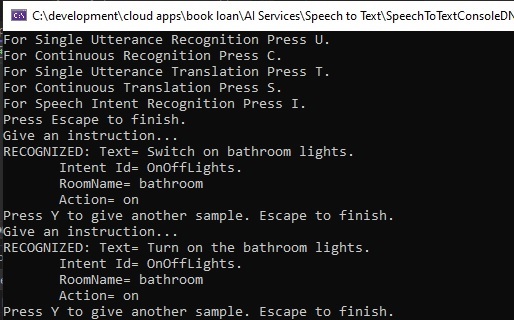
We managed to match the entity, bathroom correctly, and the action on as expected, even with the word the between the action and entity matching words:
{action} the {roomName}
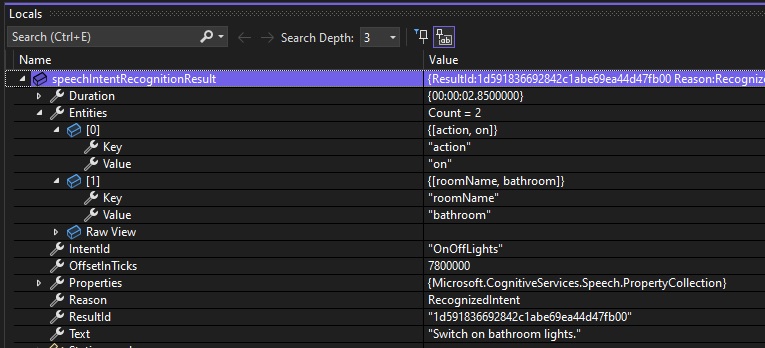
The debug snapshot is shown for the first phrase “Switch on bathroom lights”:
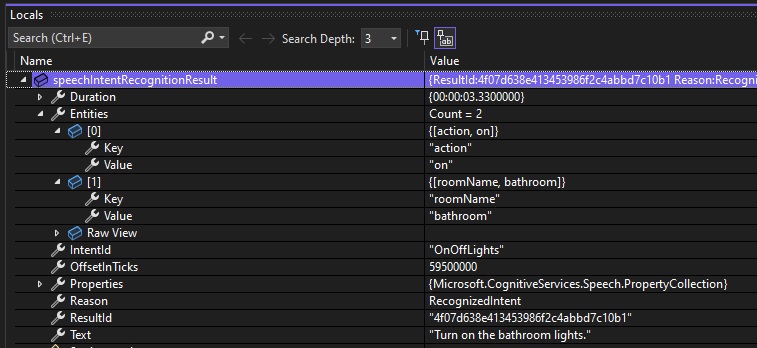
The debug snapshot is shown for the second phrase “Turn on the bathroom lights”:
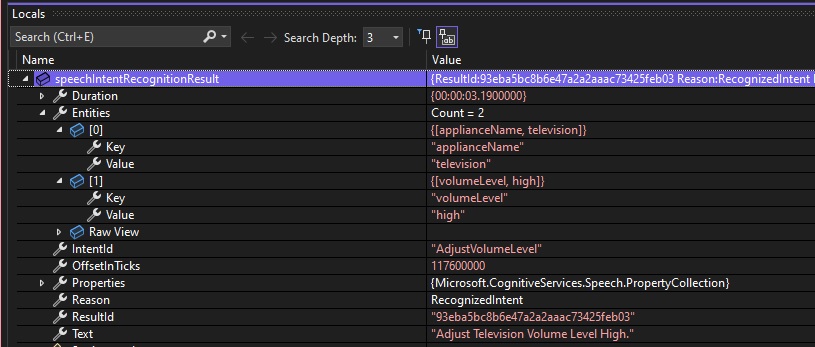
The next instruction is the phrase “Adjust television volume level high.”, which again has the entity television, and the action high detected for the intention AdjustVolumeLevel:

The debug snapshot is shown below:
The next instruction is the phrase “Close living room blinds.”, which again has the entity living. However, notice that the speech recognizer has picked up that the action close living was detected and not close for the intention OpenCloseBlinds:

The debug snapshot is shown below:
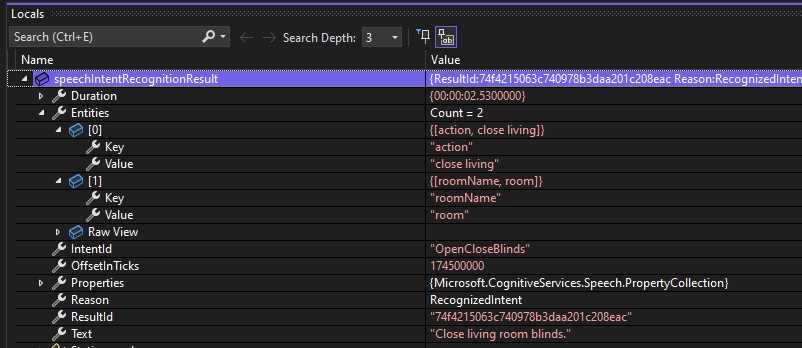
It seems that for the phrase pattern:
{action} {roomName}
when attempting to match:
“close living room”
the intent recognition seems to have matched the pattern as:
“close living room”
instead of
“close living room”
The intent pattern phrase definition is:
intentRecognizer.AddIntent("{action} {roomName} blinds.", "OpenCloseBlinds");
To correct the above issue, we will need to explicitly declare the word room as a trailing word after the matching room name.
We will need to change the intent phrase pattern to:
intentRecognizer.AddIntent("{action} {roomName} room blinds.", "OpenCloseBlinds");
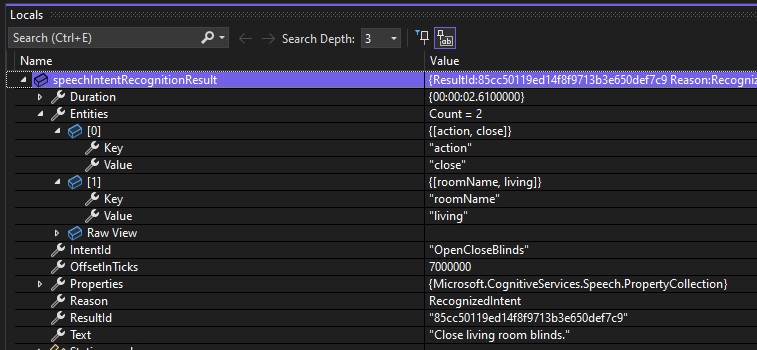
When the above adjustment is applied, and the application built and re-run, the output session for the above displays the entity and actions as shown:

The debug snapshot is shown below:
The above has shown how to use speech recognition intention to determine phrase intent from a matching phrase matter.
In the next post we will see how to use intent with an Azure Speech Service CLU model training set.
That is all for today’s post.
I hope that you have found this post useful and enjoyable.

Andrew Halil is a blogger, author and software developer with expertise of many areas in the information technology industry including full-stack web and native cloud based development, test driven development and Devops.