

Welcome to today’s post.
In today’s post I will be showing how to use another new method, the AggregateBy() LINQ method with the release of the .NET 9.0 framework library.
In the previous post I showed how to use the CountBy() LINQ method and explained one of the main reason why it was introduced.
I will be showing how to use the AggregateBy() LINQ method, and I will also show, with an example, why it was introduced as an improvement. Both methods are used to apply an operation to the items that are part of each grouping.
With the CountBy() operator, we applied a count for each item within each grouping and stored the result of the count in the query output as a value within a key-value pair. The manual, slightly longer approach was to obtain the key for each grouping, and the count of items within each grouping and store both results in a key-value pair, then output all populated key-value pairs as a list collection.
Explaining Aggregation in a Grouped Query
In this section I will explain how aggregation works within a grouped query.
With aggregation, we apply a function to the value of each item within a grouping to yield a running total. In a grouping that contains items that have a quantity or a score, we can add up the quantity or score in each grouping to arrive at a total sum within each grouping.
In the world of reporting, examples of aggregations within a grouping include:
Totals of individual scores for each team in a tournament.
Totals of quantities of items for each product category in a warehouse.
Totals of items for each media category or location in a library.
The example of items in a library, with the aggregate total of items for each book, is the example that I will demonstrate in the next section.
One way to obtain Aggregations in a Grouped LINQ query
In this section I will show how to implement grouped aggregation using a grouped LINQ query.
Below is a record declaration for a book inventory:
internal record BookInventory(int BookID, string Name, int Quantity) {}
I haven’t included a location or library property to simplify the groupings. The property Quantity could correspond to the number of books with title Name. Repeated entries with the same property, Name can have different quantities. The idea here is to group all entries with the same book name and sum of all quantities.
Below is the sample data used for the query:
static List<BookInventory> book_inventory = new List<BookInventory>()
{
    new BookInventory(1, "Book 1", 10),
    new BookInventory(2, "Book 2", 5),
    new BookInventory(3, "Book 3", 20),
    new BookInventory(4, "Book 4", 50),
    new BookInventory(5, "Book 2", 15),
    new BookInventory(6, "Book 3", 5),
    new BookInventory(7, "Book 1", 20),
    new BookInventory(8, "Book 2", 35),
    new BookInventory(9, "Book 1", 60),
    new BookInventory(10, "Book 1", 30)
};
We then apply a LINQ grouping query that includes the name of the book and its quantity in each grouping:
IEnumerable<IGrouping<string, int>> GroupByKeyValues = book_inventory
    .GroupBy(item => item.Name, item => item.Quantity);
The GroupBy() extension method selects one or more properties from the source data for grouping, with the selected properties coinciding with the type of each grouping entry within the enumerable. In the above query, we can see the Name property is a string, and the Quantity property is an int. This required us to declare the type of each item in the query collection as IGrouping<string, int>.
The above chained LINQ query declared for variable GroupByKeyValues2 uses deferred execution, so it requires us to iterate through all items to obtain properties of each entry. Below is a key-value pair to store our results:
List<KeyValuePair<string, int>> keyValuePair2 = new List<KeyValuePair<string, int>>();
The types within each key-value pair coincide with the types that we declared in the IGrouping<string, int> type in the chained query.
Within the iteration, we will need to reset the sum for each group to zero at the start of the iteration within each group items. We will then determine the sum of quantities for items within each group. Then we update each key-value pair object with the group key and sum of quantities.
Below is the iteration through the above query variable with the calculations that I just mentioned:
foreach (var groupByKeyValues in GroupByKeyValues2)
{
    string itemKey = groupByKeyValues.Key;

    int summation = 0;
    foreach (int qty in groupByKeyValues)
    {
        summation += qty;
    }

    keyValuePair2.Add(new KeyValuePair<string, int>(groupByKeyValues.Key, summation));

    Console.WriteLine($"Item Name: {groupByKeyValues.Key}. Aggregate: {summation}");
}
When the above sequence of commands is run, below is the collection of records used for the source query:
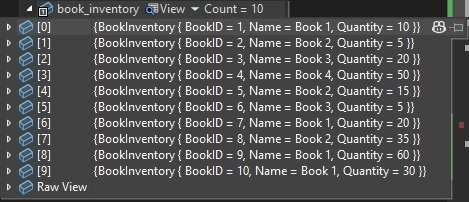
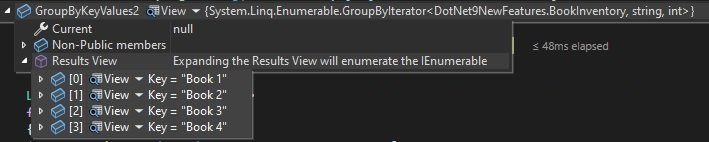
In the debug inspector, the GroupByKeyValues2 query variable shows us the key headers for four groupings for the books: “Book 1”, “Book 2”, “Book 3” and “Book 4”:
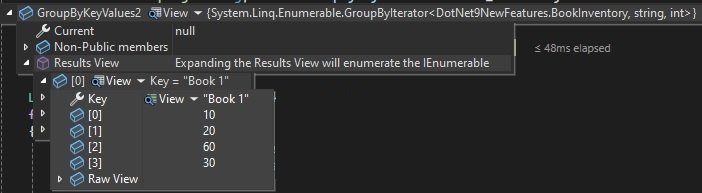
When we expand the first grouping for Book 1, we can view the values for each item, which are the four quantities that coincide with the Quantity property in the source data:
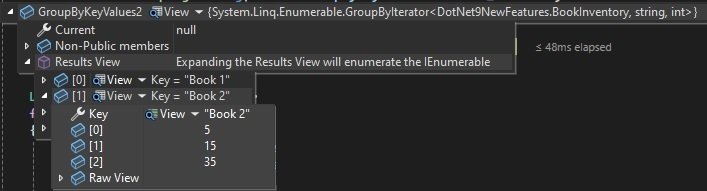
Inspecting the items for entry Book 2, wecan see three entries:
The output from the above commands including the computed aggregation is shown below:
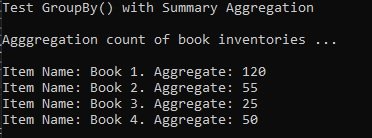
In the next section, I will show how to use the improved aggregation of results using the new LINQ extension method.
Obtaining Aggregations using AggregateBy() in a LINQ Query
In this section I will show how to implement grouped aggregation using an improvement on the grouped LINQ query and the additional extension method AggregateBy().
Before I show the LINQ query used to achieve the goal, I will explain how to use the AggregateBy() extension method.
The aggregation is applied to an enumerable source with the following parameters:
The keySelector parameter of type Func<TSource,TKey> is a function that extracts the key for each element.
The seed parameter of type TAccumulate sets the initial value for accumulation.
The func parameter of type Func<TAccumulate,TSource,TAccumulate> is an accumulator function that is invoked on each element.
Below is the declaration for aggregation that sets the key grouping to the Name property in a key selector function, resets the sum for each grouping to zero, and adds the quantity property, Quantity to the running total within an accumulator function:
AggregateBy(
    keySelector: item => item.Name,
    seed: 0,
    (totalSum, elem) => totalSum + elem.Quantity
)
In the context of the LINQ query, the aggregation is implemented as shown:
var GroupByKeyValues3 = book_inventory
    .AggregateBy(
        keySelector: item => item.Name,
        seed: 0,
        (totalSum, elem) => totalSum + elem.Quantity
    );
Note that an interesting observation is that if we set the accumulator increase to 1, such as the declaration below:
AggregateBy(
    keySelector: item => item.Name,
    seed: 0,
    (totalSum, elem) => totalSum + 1
)
What does the above mean? The above declaration then reduces to the implementation of the CountBy() extension method, as the grouping for Book 1 would have an aggregate total of 4, and the grouping for Book 2 would have an aggregate total of 3. We can see that AggregateBy() generalizes the implementation of CountBy() with a custom accumulator function.
Retrieval of results is through an iteration. Unlike the previous example, we don’t require declaring an enumerable of key-value pairs to store the results. All we do is read off the Key and Value from the grouping. The iteration is shown below:
foreach (var groupByKeyValues in GroupByKeyValues3)
{
    Console.WriteLine($"Item Name: {groupByKeyValues.Key}. Aggregate: {groupByKeyValues.Value}");
}
And that’s how simple it is to perform grouped aggregation.
Below is a debugging snapshot of the GroupByKeyValues3 query variable with the resulting groupings and their respective total sums:

The output from the above commands including the computed aggregation is shown below:
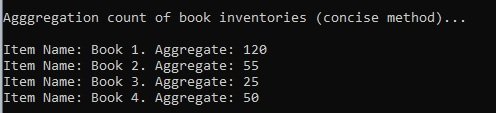
When we compare the outputs from both methods, they have the same outputs as shown:
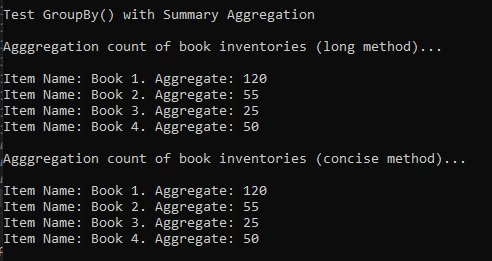
The source for the code block that demonstrates the above is shown below (without the record declaration or populated data sources, which were already shown earlier):
static void Main(string[] args)
{
    Console.WriteLine("Test GroupBy() with Summary Aggregation");
    Console.WriteLine();

    IEnumerable<IGrouping<string, int>> GroupByKeyValues2 = book_inventory
        .GroupBy(item => item.Name, item => item.Quantity);

    Console.WriteLine("Agggregation count of book inventories (long method)...");
    Console.WriteLine();

    List<KeyValuePair<string, int>> keyValuePair2 = new List<KeyValuePair<string, int>>();
    foreach (var groupByKeyValues in GroupByKeyValues2)
    {
        string itemKey = groupByKeyValues.Key;

        int summation = 0;
        foreach (int qty in groupByKeyValues)
        {
            summation += qty;
        }

        keyValuePair2.Add(new KeyValuePair<string, int>(groupByKeyValues.Key, summation));

        Console.WriteLine($"Item Name: {groupByKeyValues.Key}. Aggregate: {summation}");
    }

    Console.WriteLine();

    /// Test new AggregateBy() method
    var GroupByKeyValues3 = book_inventory
        .AggregateBy(
            keySelector: item => item.Name,
            seed: 0,
            (totalSum, elem) => totalSum + elem.Quantity
        );

        Console.WriteLine("Agggregation count of book inventories (concise method)...");
        Console.WriteLine();

        foreach (var groupByKeyValues in GroupByKeyValues3)
        {
            Console.WriteLine($"Item Name: {groupByKeyValues.Key}. Aggregate: {groupByKeyValues.Value}");
        }
}
In the above overview, I have shown a less concise way to compute aggregations from a grouped LINQ query using GroupBy(), IGrouping and some custom coding. I then showed the more concise way using the new AggregateBy() extension method, which required no additional custom code to compute the summary aggregations within each grouping.
That is all for today’s post.
I hope that you have found this post useful and informative.

Andrew Halil is a blogger, author and software developer with expertise of many areas in the information technology industry including full-stack web and native cloud based development, test driven development and Devops.