

Welcome to today’s post.
In today’s post I will be covering the usage of the new operator CountBy method that has been introduced within the LINQ query library.
Among the new inclusions to the .NET 9.0 library that was released in November 2024 as a separate download and part of Visual Studio 2022 version 17.12 are improvements to the LINQ library.
One of these inclusions is the LINQ CountBy() method, which is an improvement on grouping values and applying a count to values of elements in a grouped collection.
Including the .NET 9.0 Framework in the Application
After installing the .NET 9.0 framework, then opening Visual Studio, you will need to select the .NET 9.0 (Standard Term Support) framework (as shown below) when you create the project from the template.
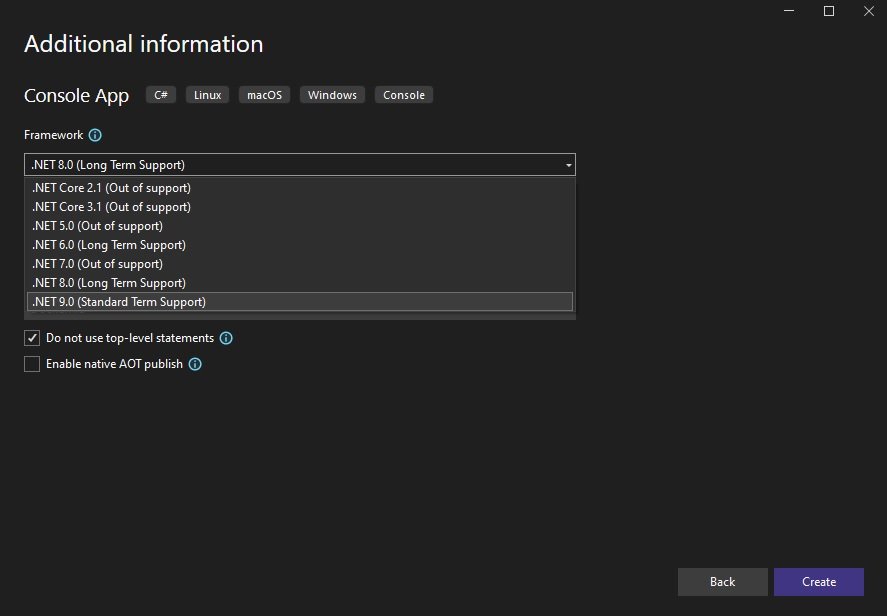
If you have forgotten to select the new library in the project creation wizard, you can manually change it in the project’s CSPROJ file in the value for the XML element <TargetFramework>:
<Project Sdk="Microsoft.NET.Sdk">
  <PropertyGroup>
    <OutputType>Exe</OutputType>
    <TargetFramework>net9.0</TargetFramework>
    <ImplicitUsings>enable</ImplicitUsings>
    <Nullable>enable</Nullable>
  </PropertyGroup>
</Project>
In the next section, I will show how to use basic grouping using a LINQ query and how to compute the counts within each group.
Overview of Basic Grouping in a LINQ Query
Before we can look at the CountBy() method, it makes sense for us to understand how the existing GroupBy() method works when we run a LINQ query. The GroupBy() method has been a part of the System.Linq library for a while.
When using the LINQ query library, you may already be familiar with the common clauses that are part of a LINQ query. These include the Select(), OrderBy(), Where(), GroupBy() and Distinct() methods. These common methods are sufficient in most cases to implement most queries, however there are some more complex queries and intermediate coding and looping that need to be used when the requirements become a little more challenging.
To make this example as simple as possible, I will create a dictionary variable that holds 15 entries as shown below:
static Dictionary<int, string> books = new Dictionary<int, string>()
{
    { 1,  "Book 1" },
    { 2,  "Book 2" },
    { 3,  "Book 3" },
    { 4,  "Book 2" },
    { 5,  "Book 2" },
    { 6,  "Book 4" },
    { 7,  "Book 1" },
    { 8,  "Book 3" },
    { 9,  "Book 4" },
    { 10, "Book 2" },
    { 11, "Book 2" },
    { 12, "Book 1" },
    { 13, "Book 5" },
    { 14, "Book 6" },
    { 15, "Book 3" }
};
Each entry has an integer key and value. When we run the above and inspect the variable, we can see each entry is an object, which when expanded has a Key and Value.
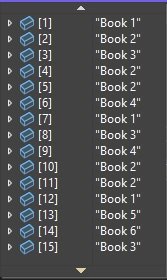
A basic query that does a selection with a grouping operator can be achieved with the above common operators. Below is one example of a query which is grouped by an item value from a dictionary collection:
var GroupByKeyValues = books
    .Select(item => item.Value)
    .GroupBy(item => item);
When we execute the above command and inspect the variable GroupByKeyValues, we see the following when expanding the variable:

So, instead of seeing all 15 entries, we see groups that consist of each of the unique Value names: “Book 1”, “Book 2”, “Book 3”, ”Book 4”, “Book 5”, “Book 6”.
When we expand the first grouping for “Book 1”, we will see three entries:

The above grouping displays the grouped entries under each key however, it does not display the actual count of the entries under each key. This is where the use of the CountBy() method comes into use.
Before I get to the use of the improved method, I will show how to obtain the count of the above groupings using a slightly inefficient means.
After obtaining the grouping from the above grouping query, we had six group entries, with each group instance having a key and one or more values.
Below is a key-value pair list collection that will store each group key and a count of the values under the grouping.
List<KeyValuePair<string, int>> keyValuePair = new List<KeyValuePair<string, int>>();
On its own, the variable GroupByKeyValues uses a chained LINQ query and uses deferred execution will not give any results on its own unless we run it through an iteration. When we do, we will then be able to view each grouping. Within each iteration, we obtain each grouping key and grouping count, then add each key and value pair into the collection:
foreach ( var groupByKeyValues in GroupByKeyValues)
{
    keyValuePair.Add(new KeyValuePair<string, int>( groupByKeyValues.Key, groupByKeyValues.Count() ));
    Console.WriteLine($"Item Name: {groupByKeyValues.Key}. Item Count: {groupByKeyValues.Count()}");
}
For debugging purposes, I have output the key and count for each grouping.
When the above is run, you will see the following output displaying each key and count:
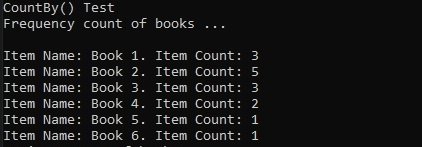
Below is the expanded view of the debug snapshot of the key value pair variable with each entry having the group key name and the count of items within each group:
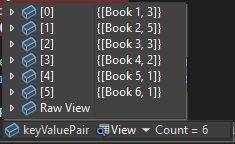
In the next section, I will show how the CountBy() method is used for the same outcome.
Overview of usage of the CountBy() method within a LINQ Query
In this section, I will show how to avoid using the GroupBy() method that was combined with an additional loop to get a list of keys and their associated item counts. I will instead use the CountBy() method.
Here’s how the query looks:
var frequencyKeyValues = books
    .Select(item => item.Value)
    .CountBy(item => item);
When the above query command is run, the debug snapshot view of the frequencyKeyValues variable looks as shown:
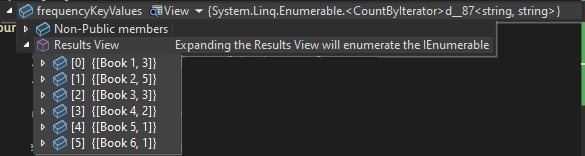
Notice that the above result is identical to that of the constructed collection keyValuePair that we saw in the previous section.
In addition to the output and computation of the count for each grouping, we can obtain the grouping that has the highest number of items within its grouping. This is through the MaxBy() method as shown:
var maxKeyValue = books
    .Select(item => item.Value)
    .CountBy(item => item)
    .MaxBy(item => item.Value);
When the above is run and we view the debug snapshot of the maxKeyValue variable, what we see is a single key-value that represents the maximum grouping:
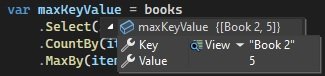
The code to demonstrate the above two approaches is shown below:
internal class Program
{
    static Dictionary<int, string> books = new Dictionary<int, string>()
    {
        { 1,  "Book 1" },
        { 2,  "Book 2" },
        { 3,  "Book 3" },
        { 4,  "Book 2" },
        { 5,  "Book 2" },
        { 6,  "Book 4" },
        { 7,  "Book 1" },
        { 8,  "Book 3" },
        { 9,  "Book 4" },
        { 10, "Book 2" },
        { 11, "Book 2" },
        { 12, "Book 1" },
        { 13, "Book 5" },
        { 14, "Book 6" },
        { 15, "Book 3" }
    };

    static void Main(string[] args)
    {
        Console.WriteLine("Test GroupBy() with Iterative Count");
        Console.WriteLine();

        var GroupByKeyValues = books
            .Select(item => item.Value)
            .GroupBy(item => item);

        Console.WriteLine("Frequency count of books ...");
        Console.WriteLine();

        List<KeyValuePair<string, int>> keyValuePair = new List<KeyValuePair<string, int>>();
        foreach ( var groupByKeyValues in GroupByKeyValues )
        {
            keyValuePair.Add(new KeyValuePair<string, int>( groupByKeyValues.Key, groupByKeyValues.Count() ));
            Console.WriteLine($"Item Name: {groupByKeyValues.Key}. Item Count: {groupByKeyValues.Count()}");
        }

        Console.WriteLine();

        Console.WriteLine("Test new CountBy()");
        Console.WriteLine();

        var frequencyKeyValues = books
            .Select(item => item.Value)
            .CountBy(item => item);

        Console.WriteLine("Frequency count of books ...");
        Console.WriteLine();

        foreach (var item in frequencyKeyValues)
        {
            Console.WriteLine($"Item Name: {item.Key}. Item Count: {item.Value}");
        }

        var maxKeyValue = books
            .Select(item => item.Value)
            .CountBy(item => item)
            .MaxBy(item => item.Value);

        Console.WriteLine("Maximum count of books ...");
        Console.WriteLine();
        Console.WriteLine($"Item with highest occurence: {maxKeyValue.Key}. Occurrence: {maxKeyValue.Value}");

    }
}
Sample output from the above is shown below:
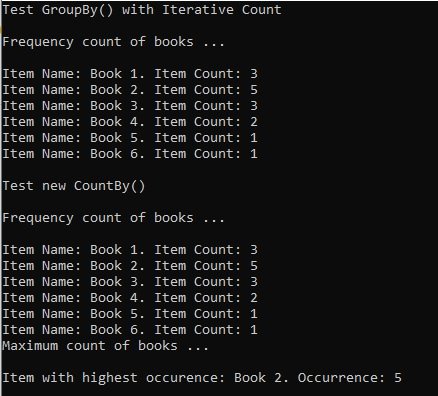
We have seen how to run LINQ queries that compute the grouping and count of group items for each unique item within a dictionary collection. Of the two approaches, I have shown how to achieve the same outcome using the new CountBy() method that was part of the .NET 9.0 release.
That is all for today’s post.
I hope that you have found this post useful and informative.

Andrew Halil is a blogger, author and software developer with expertise of many areas in the information technology industry including full-stack web and native cloud based development, test driven development and Devops.

