
Welcome to today’s post.
In today’s post I will showing how to use one of the GPT generative AI natural language models to generate source code.
In an earlier post, I showed how to select and deploy an existing GPT OpenAI generative AI natural language model. I then showed how to use the deployed GPT model in a Chat Playground, where we submitted prompts relating to developing with generative AI and received helpful responses from the assistant (or model). The responses (or completions) we received used the context from the system message and chat history to craft realistic responses that make use of previous assistant responses.
Before I show how code is generated, I will give an overview of the GPT models that are available, and which ones can be used for code generation.
Using the GPT OpenAI Models for Code Completions
In this section, I will explain how code generation is related to the natural language models that are from the OpenAI GPT model version 3 and earlier and including the most recent 3.5 and 4.0 versions.
The less recent OpenAI GPT models were trained specifically to handle and process natural language prompts. The most recent OpenAI GPT models, which include the GPT-35-turbo and GPT-4 models are pre-trained to understand both language and code, so they can handle the processing of both natural language and code prompts, then provide completions containing both natural language and code completions.
Unlike Azure AI Vision, Speech, Language and Image models that can be trained as a customized model as from a base model, then deployed for consumption through a client SDK or REST API, the OpenAI Generative API GPT models are pre-trained and ready for deployment and consumption through the client OpenAI SDK or the OpenAI REST API.
This level of flexibility with the GPT model allows it to be used in contexts where we can use it to help us supply a prompt, then receive a completion that contains a sample of code that will help us with our development.
We have seen in a development environment such as Visual Studio, where we can have code completions done for basic code idioms, such as for loops, while loops, variable declarations, method and function stubs, and documentation. These code completions are intellisense, which obtains its code snips from a known knowledge base that comes with the compiler technology.
The next level of code completions is where we ask for a piece of code based on a natural language prompt, then the development environment, which is connected to a deployed OpenAI GPT model provides us with a code snip for methods or functions that can help us with our work. Recently, this has been provided with the GitHubCoPilot for Visual Studio extension that can provide the code completions for us. This is essentially works like a pair programmer AI Assistant.
The free option requires developers to either be students, maintainers of popular open-source projects in GitHub, otherwise you will require or to have a monthly or annual subscription to GitHub CoPilot to make use of the service.
Instead of using the GitHub CoPilot service, you can alternatively use a existing Azure OpenAI GPT model on a pay-as-you-go Azure subscription plan and output code excerpts as you need. The code generation can either be done in the Azure AI Studio or in a client application.
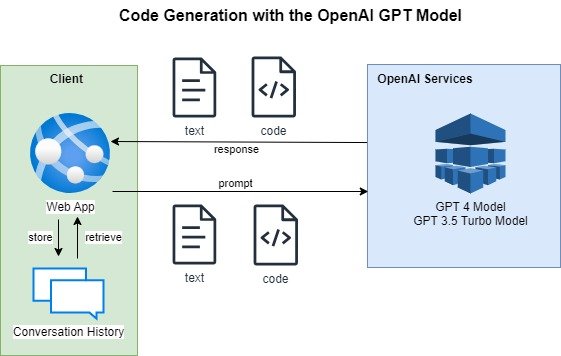
Below is a diagram that shows how a typical chat client sends text and code prompts to one of the OpenAI GPT models, receives text and code chat completion responses and stores the conversation history to provide context in the next call to the generative AI GPT model in the conversation:
In the next section, I will show how we can obtain some useful code generations using the OpenAI GPT models in the Azure AI Studio.
Example Code Generation with the GPT OpenAI Models
In this section, I will show you an example of how we can prompt the deployed GPT 3.5 turbo model to help us with a function that receives a list of numbers and returns their average.
We can do this is the Chat playground in the Azure AI Studio after we deployed a pre-trained GPT-35-turbo model. Below is our screen with the chat dialog and prompt:
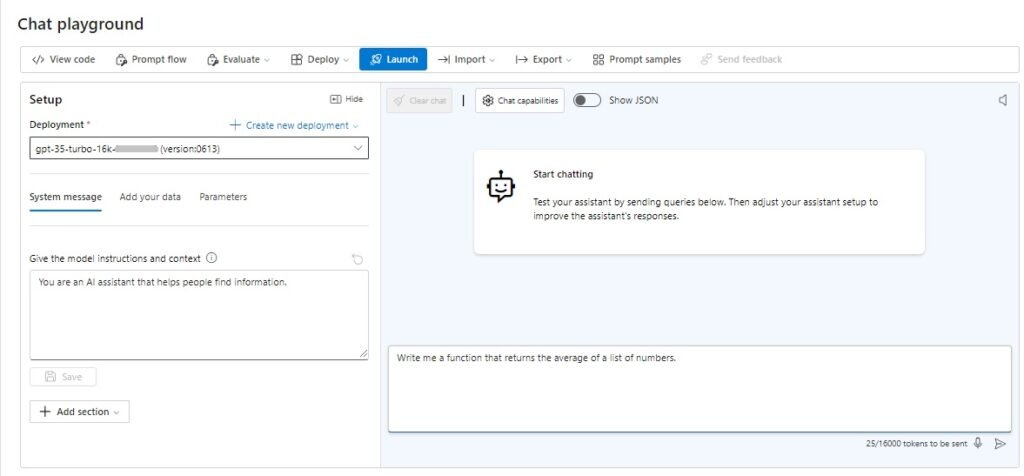
I then enter the following prompt into the text box:
Write me a function that returns the average of a list of numbers.
I then see a response from the model from the assistant:
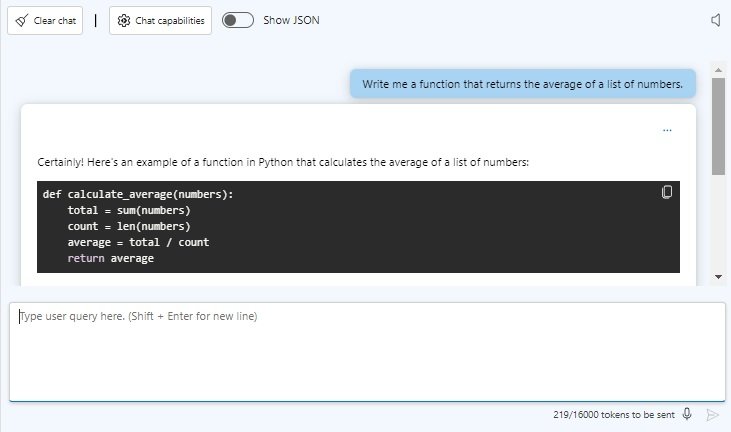
The entire response is shown below:
Certainly! Here’s an example of a function in Python that calculates the average of a list of numbers:
def calculate_average(numbers):
total = sum(numbers)
count = len(numbers)
average = total / count
return average
To use this function, you can pass in a list of numbers as an argument. Here’s an example:
numbers = [1, 2, 3, 4, 5]
result = calculate_average(numbers)
print(result) # Output: 3.0
In this example, the calculate_average() function takes a list of numbers as the numbers parameter. It uses the sum() function to calculate the total of all the numbers in the list, and the len() function to get the count of numbers. The average is then calculated by dividing the total by the count, and finally, the average is returned as the result.
Notice that by default, you have noticed that the answer is by default in the Python language. What happens if I want the answer in a different language, such as C#?
This is easy. Since the GPT 3.5 Turbo Chat Completion API can handle conversational history and its context, we can provide the following simple prompt to receive the equivalent response in the C# language:
Can I have the function in C#?
The response is shown below with the declaration in C# syntax:
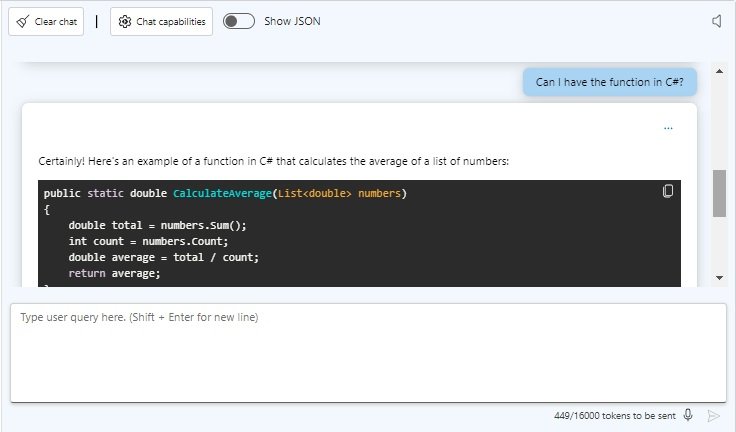
The entire response is shown below:
Certainly! Here’s an example of a function in C# that calculates the average of a list of numbers:
public static double CalculateAverage(List<double> numbers)
{
double total = numbers.Sum();
int count = numbers.Count;
double average = total / count;
return average;
}
To use this function, you can pass in a List<double> of numbers as an argument. Here’s an example:
List<double> numbers = new List<double> { 1, 2, 3, 4, 5 };
double result = CalculateAverage(numbers);
Console.WriteLine(result); // Output: 3
In this example, the CalculateAverage() function takes a List<double> of numbers as the numbers parameter. It uses the Sum() method to calculate the total of all the numbers in the list, and the Count property to get the count of numbers. The average is then calculated by dividing the total by the count, and finally, the average is returned as the result.
In the next section, I will show how we can obtain useful code completions using the OpenAI GPT models in the Azure AI Studio.
Example Code Completions with the GPT OpenAI Models
In this section, I will show you an example of how we can prompt the deployed GPT 3.5 turbo model to help us complete a partial function that receives a pair of numbers and returns a calculation.
Completions of partial code is similar to how we use the intellisense code completion feature in Visual Studio when we type in the first part of a code idiom, press the tab key, then have a default code stub entered for the developer to use.
Like we did for code generation, we can use the Chat playground in the Azure AI Studio after we deployed a pre-trained GPT-35-turbo model. Below is our screen with the chat dialog and prompt:
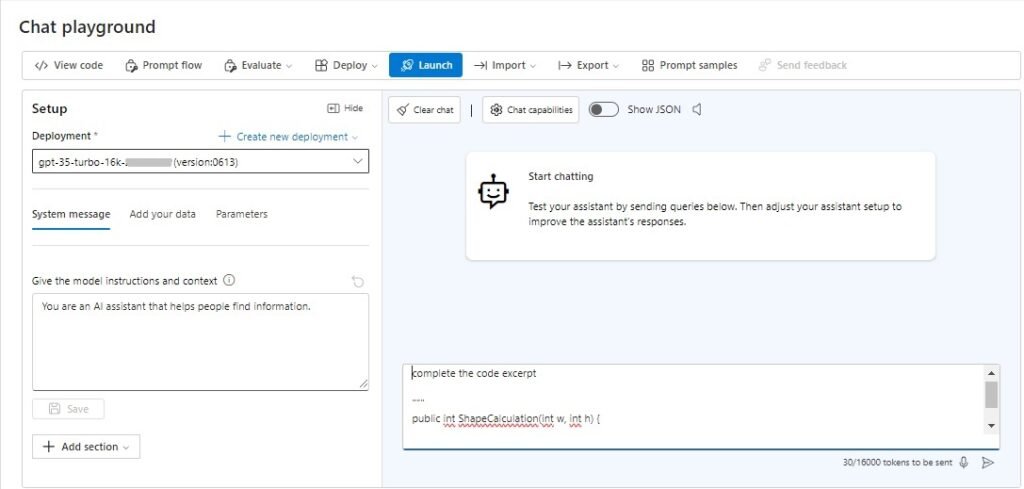
To send a prompt that asks the model to complete a code excerpt, we use a section marker, which is used to format instructions by splitting them from the initial prompt.
The section marker can use —, ###, or “”” characters to format the instructions to distinguish the instruction in the prompt to the content.
So, when we issue the following prompt:
complete the code excerpt
“””
public int ShapeCalculation(int w, int h) {
We might expect the response to assume that we were asking for a function that computed the area of a rectangle, or even a function that computed the perimeter of a rectangle. The response that was returned is shown below:
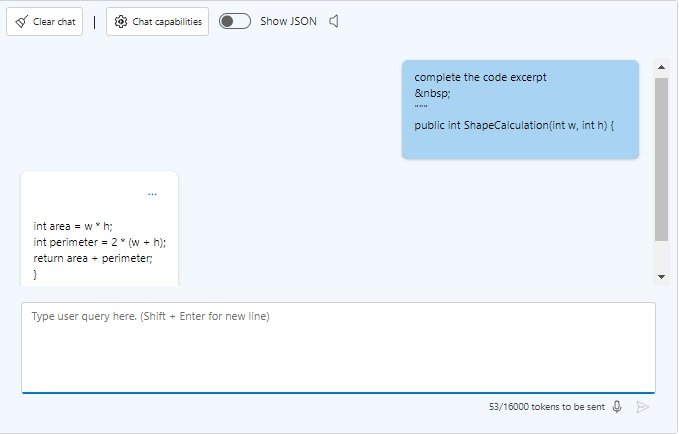
Notice that the response tried to combine more than one calculation into the answer. What is did was to add the area to the perimeter and return that as the result, instead of giving two different functions:
int area = w * h;
int perimeter = 2 * (w + h);
return area + perimeter;
}
We could have alternatively, changed the initial prompt to explicitly ask for a function that computed the perimeter or the area:
complete the code excerpt to compute the perimeter
OR
complete the code excerpt to compute the area
We know that the context in the conversation history can be used, so when issue the prompt:
I want the perimeter calculated.
The assistant knows we are referring to the initial answer, so it responds with:
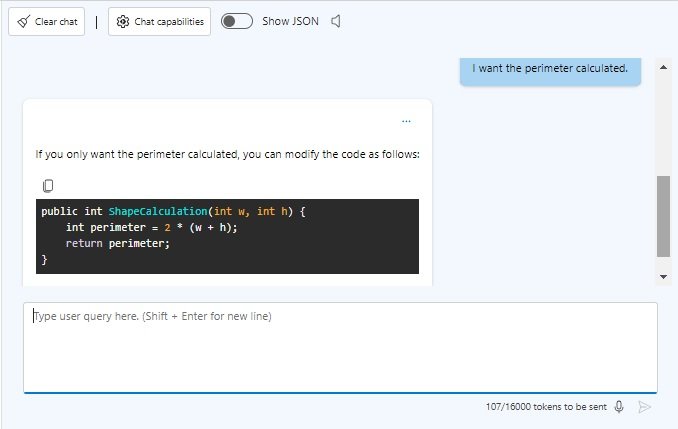
The text of the response is shown below:
If you only want the perimeter calculated, you can modify the code as follows:
public int ShapeCalculation(int w, int h) {
int perimeter = 2 * (w + h);
return perimeter;
}
Summary
We have seen how to use the GPT chat model to generate new code from a prompt or generate code completions from a prompt with partial code.
As you can see from the responses, the output provides both code and a description that explains what the code does. The generated code is provided from publicly available GitHub code repositories. Be aware that the code should be re-validated for correctness from your own unit tests before using in commercial applications.
Also, please remember that using code generation services and models does not replace the need to do actual problem-solving during software design and development. Neither does automated code generation replace the role of what an experienced software developer offers an organization. You can rest assured that experienced developers with expertise such as myself will not be replaced with artificially intelligent code generators. What they will do is to make less experienced developers more efficient in the problem-solving process in the earlier stages of their careers.
As a new developer, you should also independently assess the suitability of the generated code to your own application requirements and explore other alternatives to coding solutions discovered from other sources, including internet searches, online courses, training, technical references, and more experienced developers.
In a future post, I will show how to use code generation from a client application.
That is all for today’s post.
I hope that you have found this post useful and informative.

Andrew Halil is a blogger, author and software developer with expertise of many areas in the information technology industry including full-stack web and native cloud based development, test driven development and Devops.
