

Welcome to today’s post.
In today’s post I will be explaining what Named Entity Recognition is and showing you how to use it within an application with Azure Text Analytics.
There are two different variations of entity recognition that we can use in Azure Text Analytics:
- Named Entity Recognition
- Custom Named Entity Recognition
The first type of named entity recognition uses prebuilt models and the second type of named entity recognition uses custom built and trained language models in Azure Language Services.
In this post I will be explaining and showing how to use Named Entity Recognition. I will describe it in the first section.
What is Named Entity Recognition?
Named Entity Recognition or NER is a task that is performed as part of Natural Language Processing. What NER does is to analyze the text within a document, and determine which words match predefined entity categories. It then extracts these entities into a list of matched named entities and their respective categories.
The first type of named entity recognition uses prebuilt models in Azure Language Services to recognize and extract named information from text and classify them into entities.
The second type of named entity recognition uses custom built and trained language models in Azure Language Services to recognize and extract custom named information from text and classify them into entities.
As we saw in a previous post where we constructed a Conversational Language Understanding (CLU) model, we created and labeled entities within a training dataset and defined these to be represented by a list of values.
What Prebuilt Entity Categories are Available?
Prebuilt entities are the categories or buckets of entities that we place each matched word in a document.
With prebuilt entities, when NER analyzes the text within documents the different categories of entities include:
Address
DateTime
Event
IP
Location
Organization
Person
PersonType
PhoneNumber
Product
Quantity
Skill
URL
After each word is recognized as a member of an entity, it is extracted.
Prebuilt entity categories are defined and trained named entities as part of pretrained AI language models in Azure Language Services that provide a very high level of accuracy in identifying a word into an entity category.
This accuracy is however limited to the target language that we are using for the NLP task. In the case of the English language, we could with high degree of accuracy, identify any person name that contains Western sounding names, however, when there are names that are in a different language, the accuracy in identification and extraction will be lower. We understand potential limitations with this, however when the text is in the intended target language, we will get some high-quality extracted output.
Applying Named Entity Recognition with Azure Text Analytics
Before we can use the development environment, we will need to supply the endpoint and key to access the Azure Language Services resource.
We can do this by setting the values in the environment using SETX as shown:
SETX TEXT_ANALYTICS_ENDPOINT [your text analytics endpoint]
SETX TEXT_ANALYTICS_KEY [your text analytics key]
After we have opened the Visual Studio development IDE and created the console application, when will next need to setup the application to use the Azure Text Analytics library, we will need to install the NuGet package:
Azure.AI.TextAnalytics
We then declare variable to hold these resource settings:
static string textanalyticsEndpoint = String.Empty;
static string textanalyticsKey = String.Empty;
And read the environment variables into them using:
textanalyticsEndpoint = Environment.GetEnvironmentVariable("TEXT_ANALYTICS_ENDPOINT");
textanalyticsKey = Environment.GetEnvironmentVariable("TEXT_ANALYTICS_KEY");
Creating and initializing an instance to the TextAnalyticsClient class is done with the following code:
Uri endpoint = new(textanalyticsEndpoint);
AzureKeyCredential credential = new(textanalyticsKey);
TextAnalyticsClient client = new(endpoint, credential);
Below is the main section of the code to accept input of the document text from the user then call the custom method AnalyzingDocumentEntities() which accepts arguments consisting of an instance of the TextAnalyticsClient class and the text of the document.
using Azure;
using Azure.AI.TextAnalytics;
using System;
using System.Text;
using static System.Net.Mime.MediaTypeNames;

namespace TextAnalyticsDemos
{
    internal class Program
    {
        static string textanalyticsEndpoint = String.Empty;
        static string textanalyticsKey = String.Empty;

        static void Main(string[] args)
        {
            InitializeVariables();

            Uri endpoint = new(textanalyticsEndpoint);
            AzureKeyCredential credential = new(textanalyticsKey);
            TextAnalyticsClient client = new(endpoint, credential);

            StringBuilder sb = new StringBuilder();

            while (true)
            {
                sb.Clear();

                string optionSelected = String.Empty;

                Console.WriteLine();
                Console.WriteLine("Select one of the Menu Demo options 1-2:");
                Console.WriteLine();
                Console.WriteLine("1. Document Entity Extraction Analysis Demo");
                Console.WriteLine("2. Document Sentiment Analysis Demo");
                Console.WriteLine("Press Escape to finish.");
                Console.WriteLine();

                ConsoleKeyInfo menuConsoleKeyInfo = Console.ReadKey(true);

                if (menuConsoleKeyInfo.Key == ConsoleKey.D1)
                {
                    optionSelected = "1";
                }

                if (menuConsoleKeyInfo.Key == ConsoleKey.D2)
                {
                    optionSelected = "2";
                    …
                }

                Console.WriteLine();

                ConsoleKeyInfo consoleKeyInfo = Console.ReadKey(true);

                if (consoleKeyInfo.Key == ConsoleKey.Escape)
                {
                    Console.WriteLine("Exiting application.");
                    break;
                }

                if (optionSelected == "1")
                {
                    Console.WriteLine("Enter a sample paragraph of text to analyze:");
                    string inputText = Console.ReadLine();
                    if (!string.IsNullOrEmpty(inputText))
                    {
                        sb.AppendLine(inputText);
                        while ((inputText != null) && (inputText.Length > 0))
                        {
                            inputText = Console.ReadLine();
                            sb.AppendLine(inputText);
                        }
                        AnalyzingDocumentEntities(client, sb.ToString());
                        sb.Clear();
                    }
                }

                if (optionSelected == "2")
                {
                    …
                }

                Console.WriteLine("----------------");
                Console.WriteLine();
            }
        }

        private static void InitializeVariables()
        {
            textanalyticsEndpoint = Environment.GetEnvironmentVariable("TEXT_ANALYTICS_ENDPOINT");
            textanalyticsKey = Environment.GetEnvironmentVariable("TEXT_ANALYTICS_KEY");
        }
	…
    }
}
The remaining section of code is the custom method AnalyzingDocumentEntities(), which we use to analyze the provided text, then extract matching values of named entities.
Before I show the method implementation, I will explain the main Text Analytics SDK method that is used to recognize the named entities. The SDK method of the TextAnalyticsClient class we use is RecognizeEntities(). Its definition is below:
CategorizedEntityCollection RecognizeEntities(string textSample);
The above method then returns a collection of extracted entity values of type CategorizedEntity, which we iterate through the obtain the values.
Each CategorizedEntity class has the following properties, which we can then extract the entity values:
Text
Category
ConfidenceScore
Where:
Text is the matching word in the document.
Category is the entity category of the matched word.
ConfidenceScore is the probability that the matched word is a real named entity.
The method is shown below:
private static void AnalyzingDocumentEntities(TextAnalyticsClient client, string? sampleText)
{
    try
    {
        Console.WriteLine();

        // Get entities
        CategorizedEntityCollection entities = client.RecognizeEntities(sampleText);
        if (entities.Count > 0)
        {
            Console.WriteLine("\nEntities:");
            foreach (CategorizedEntity entity in entities)
            {
                Console.WriteLine($"\t{entity.Text} ({entity.Category}). Confidence Score: {entity.ConfidenceScore}.");
            }
        }
    }
    catch (RequestFailedException exception)
    {
        Console.WriteLine($"Error Code: {exception.ErrorCode}");
        Console.WriteLine($"Message: {exception.Message}");
    }
}
Below a sample document text, which is part of a fictitious job application covering letter, that I have input into the above application:
My name is Joe Bloggs and I am applying for the the position of Technical Director that was advertised on 1/10/2024.
Attached are further details to support my application, including my CV and references.
My contact details are jbloggs@abcd.com and mobile 0400-000-001.
Regards,
Joe Bloggs.
And below is the output we get from the above input:
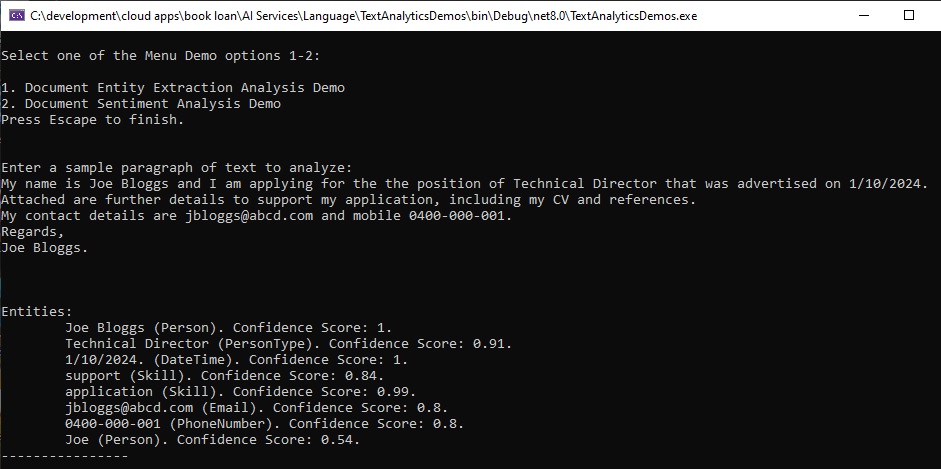
You can notice that six named entity types have been extracted:
Person
PersonType
DateTime
Skill
PhoneNumber
Location
Notice also that the name “Joe” is recognized as a Person entity with a confidence of 0.54. The extraction entity NLP algorithms seem to work in a contextual manner, with the name “Joe Bloggs” given a much higher confidence of 1, given that it precedes the adjective name.
Also notice that the extracted entities, “support” and “application” are determined to be part of the Skill entity category, even though the context states that this is a job application and not a software application, and the use of application attachments that supporting the application process is different from the concept of technical support.
Other than the above anomalies, the entity extraction process has been quite accurate in determining which words to categorize, however the matching category to the extracted word has not always been 100% accurate. To alleviate this would require the construction of a custom Named Entity Recognition model that can be trained with more examples of sentences that contain custom entities that require the use of a word such as “support” to be prefixed with words like “technical” or “application”.
In the world of Machine Learning metrics, the named entity recognition extraction has a high recall but a lower precision, as we noticed two of the extracted words were in an unexpected entity category.
In a future post I will explore using a custom AI Language model to refine the recognition and extraction of custom named entities within a document.
That is all for today’s post.
I hope that you have found this post useful and informative.

Andrew Halil is a blogger, author and software developer with expertise of many areas in the information technology industry including full-stack web and native cloud based development, test driven development and Devops.

