

Welcome to today’s post.
In today’s post, I will be showing you how to generate unit tests from either existing code or generated code from an OpenAI GPT Chat completion request.
The generation of unit tests extends from when we saw how, in one of my previous posts on how to generate source code from prompts. We could either generate code and unit tests directly from a prompt, or first generate the code from a prompt, then generate the unit tests from a subsequent prompt. I will show how this is done later.
Before we generate unit tests for the presented method or function, we could also improve the code by running an additional prompt to refactor and optimize it.
As an experienced developer you may already be familiar with the task of implementing unit tests for an application. In previous posts I have shown how to create unit tests in various types of applications with .NET Core, with Web API controllers, and Angular frontend application components.
When to use Generative AI Code Completion Models
The use of the Generative AI OpenAI GPT models to generate unit tests should not be used solely as a means for you to generate unit tests in an application. They should be used in conjunction with your existing knowledge of the business logic and rules you enforce within the application you are building. They can be usefully utilized to save time in the generation of unit tests, which can then be added to the test suite of the application.
If you are a highly experienced developer, creating unit tests may be second nature, and you may not require any additional tools to generate these. If you are an inexperienced developer, and still understanding what unit tests are, and how many you need to implement for the application, then using a Generative AI model to create some starter unit tests can be a starting point, where you can have some generated for you that can be used immediately.
Some unit tests that are in larger business classes may require a greater understanding of the business rules of the application, and so may require more of your own skills to code these. When you need a unit test for a more complex business rule, you would need to submit more details on the problem that you want solved. In this case, you would need to be aware that any code prompts submitted to the OpenAI Generative AI model are likely to be used to training the natural language models for code completion.
You would also need to be aware if the code you are submitting to the Generative AI model is in the public domain, or has any commercial confidentiality attached to it.
The Use of Unit Tests in Applications Development
In cases where we have manually written unit tests for the applications, we had to understand the different test cases that we wanted to test. Usually, the more dependencies there are on a function or class, the greater the need to provide unit tests. The test cases that are dependent on different application business rules are required to pass all required tests before we could release the code to the next phase of the software development life cycle, which is the test phase.
When a developer creates an NUnit unit test project in Visual Studio, the following skeleton source code is generated:
using NUnit.Framework;
namespace Tests
{
    [TestFixture]
    public class Tests
    {
        [SetUp]
        public void Setup()
        {
            // blank setup - to be implemented
        }

        [Test]
        public void Test1()
        {
            // blank test - to be implemented
        }
    }
}
Each test method is decorated with the [Test] attribute.
Within each test method we then write the assertions that test if an actual result matches the expected result:
Assert.AreEqual([expected value], [actual value]);
The actual value is computed from an existing business rule that is used within the application. The computation of the result from the business rule can be as simple or as complex as required before the assertion. The expected value is a constant value that we expect to match against the value generated from the computation of the business rule.
If the above assertion does is true, then we can pass the test with the following command:
Assert.Pass();
Where we have general utility functions that are dependencies on other critical business functions or classes within the application, such as one where we obtain the average of a sequence of numeric entries in an array, we would still need to ensure that test cases were created. If there were no test cases created for dependent functions, then any changes during the development phase could break other parts of the application and yield critical (and embarrassing) application errors.
In the next section, I will show how to submit prompts to an OpenAI GPT 3.5 model to generate unit tests.
Generation of Unit Tests with the OpenAI GPT Model
When we run code prompts to generate our unit tests, we can use the Azure AI Studio against a deployed OpenAI GPT 3.5 Turbo Chat Completion model, or we can use a client application to submit code prompts through the Azure OpenAI Chat GPT SDK.
In this section, I will show the results of submitting the code prompts through the client console application. The results will not differ from when using the Azure AI Studio.
To submit a prompt to request generation of unit tests for a specific function, we can use the following prompt structure:
Write four unit tests for the following function.
\n
---

[place your function here]

\n
Where the section [place your function here] is the input function. An example function content is shown below:
public int Func ()\n
{\n
    return 1;\n
}\n
\n
Notice that the prompt text must include newline characters \n to tell the OpenAI model Chat Completion API to parse and process the string content with multiple lines as one submission.
Also, be aware that the token limit for the deployed model can accommodate the total token size of the requested number of unit tests.
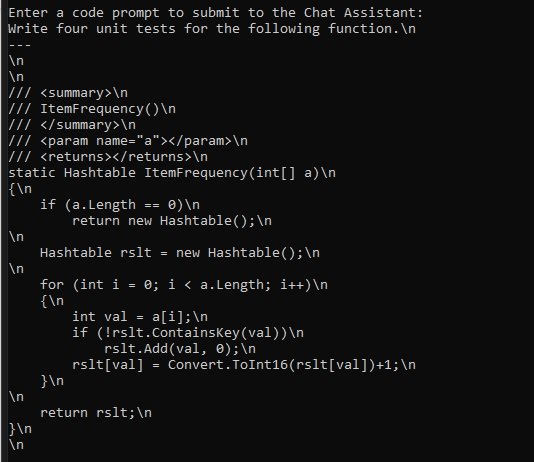
Below is a prompt that asks for the generation of unit tests for the specified function:
Write four unit tests for the following function.\n
---
\n
\n
/// <summary>\n
/// ItemFrequency()\n
/// </summary>\n
/// <param name="a"></param>\n
/// <returns></returns>\n
static Hashtable ItemFrequency(int[] a)\n
{\n
    if (a.Length == 0)\n
        return new Hashtable();\n
\n
    Hashtable rslt = new Hashtable();\n
\n
    for (int i = 0; i < a.Length; i++)\n
    {\n
        int val = a[i];\n
        if (!rslt.ContainsKey(val))\n
            rslt.Add(val, 0);\n
        rslt[val] = Convert.ToInt16(rslt[val])+1;\n
    }\n
\n
    return rslt;\n
}\n
\n
`
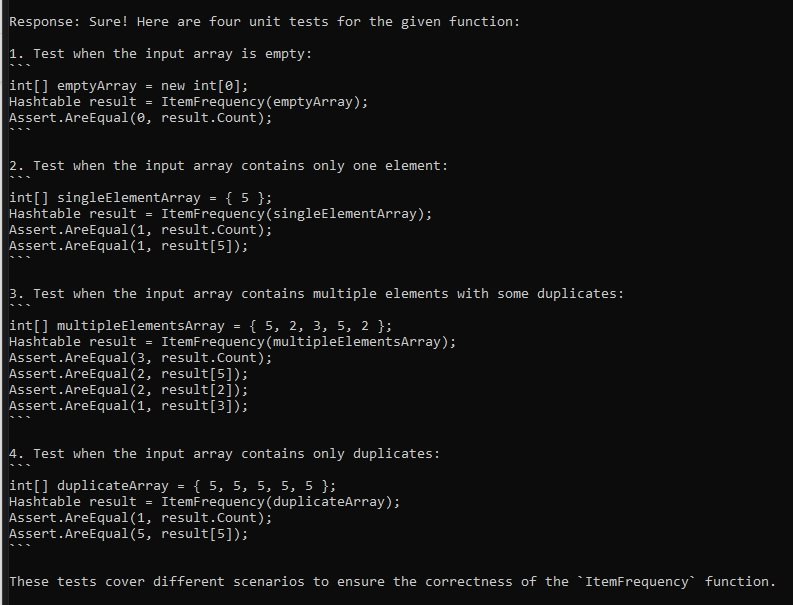
Below is the response you can get from the model:
Sure! Here are four unit tests for the given function:

1. Test when the input array is empty:
```
int[] emptyArray = new int[0];
Hashtable result = ItemFrequency(emptyArray);
Assert.AreEqual(0, result.Count);
```

2. Test when the input array contains only one element:
```
int[] singleElementArray = { 5 };
Hashtable result = ItemFrequency(singleElementArray);
Assert.AreEqual(1, result.Count);
Assert.AreEqual(1, result[5]);
```

3. Test when the input array contains multiple elements with some duplicates:
```
int[] multipleElementsArray = { 5, 2, 3, 5, 2 };
Hashtable result = ItemFrequency(multipleElementsArray);
Assert.AreEqual(3, result.Count);
Assert.AreEqual(2, result[5]);
Assert.AreEqual(2, result[2]);
Assert.AreEqual(1, result[3]);
```

4. Test when the input array contains only duplicates:
```
int[] duplicateArray = { 5, 5, 5, 5, 5 };
Hashtable result = ItemFrequency(duplicateArray);
Assert.AreEqual(1, result.Count);
Assert.AreEqual(5, result[5]);
```

These tests cover different scenarios to ensure the correctness of the `ItemFrequency` function.
Below are the screen shots from the client console application. The first shows the content for the submission to the Azure OpenAI GPT 3.5 Turbo Model Chat Completion CompleteChat() SDK method:
The next screen shot shows the response from the Chat Completion call:
We have seen from the above how to generate unit tests from a specified function or method with submissions to an Azure OpenAI GPT Model that supports code completion.
I have also discussed the traditional unit test implementations and when we can use the generational AI prompts to improve productivity during application development.
That is all for today’s post.
I hope that you have found this post useful and informative.

Andrew Halil is a blogger, author and software developer with expertise of many areas in the information technology industry including full-stack web and native cloud based development, test driven development and Devops.